Commands
1. Build tools
1.1. install
SYNOPSIS:
    Installs bash-tools.

USAGE: install [OPTIONS]
USAGE: install [--help|-h] [--config]
  [--bash-framework-config <bash-framework-config>] [--verbose|-v] [-vv] [-vvv]
  [--log-level <log-level>] [--log-file <log-file>]
  [--display-level <display-level>] [--no-color] [--theme <theme>] [--version]
  [--quiet|-q] [--skip-backup]

GLOBAL OPTIONS:
  --help, -h {single}
    Displays this command help
  --config {single}
    Displays configuration
  --bash-framework-config <bash-framework-config> {single}
    Use alternate bash framework configuration.
  --verbose, -v {single}
    Info level verbose mode (alias of --display-level INFO)
  -vv {single}
    Debug level verbose mode (alias of --display-level DEBUG)
  -vvv {single}
    Trace level verbose mode (alias of --display-level TRACE)
  --log-level <log-level> {single}
    Set log level
    Possible values:
      - OFF
      - ERR
      - ERROR
      - WARN
      - WARNING
      - INFO
      - DEBUG
      - TRACE
    Default value: OFF
  --log-file <log-file> {single}
    Set log file
    Default value: /logs/bash.log
  --display-level <display-level> {single}
    Set display level
    Possible values:
      - OFF
      - ERR
      - ERROR
      - WARN
      - WARNING
      - INFO
      - DEBUG
      - TRACE
    Default value: INFO
  --no-color {single}
    Produce monochrome output. alias of --theme noColor.
  --theme <theme> {single}
    Choose color theme - default-force means colors will be produced even if
    command is piped.
    Possible values:
      - default
      - default-force
      - noColor
    Default value: default
  --version {single}
    Print version information and quit.
  --quiet, -q {single}
    Quiet mode, doesn't display any output.

OPTIONS:
  --skip-backup {single}
    skip backup of ~/bash-tools.


DESCRIPTION:
Installs dependent softwares and configuration needed to use bash-tools:
- GNU parallel - Installs or updates default configuration files
  If ~/.bash-tools directory already exists, a backup will be done before

VERSION: 3.0

AUTHOR: [François Chastanet](https://github.com/fchastanet)

SOURCE FILE: https://github.com/fchastanet/bash-tools-framework/tree/master/src/_binaries/build/install/install-binary.yaml

LICENSE: MIT License
Copyright (c) 2022-now François Chastanet
1.2. bin/installRequirements
SYNOPSIS:
    Installs requirements.

USAGE: installRequirements [OPTIONS]
USAGE: installRequirements [--help|-h] [--config]
  [--bash-framework-config <bash-framework-config>] [--verbose|-v] [-vv] [-vvv]
  [--log-level <log-level>] [--log-file <log-file>]
  [--display-level <display-level>] [--no-color] [--theme <theme>] [--version]
  [--quiet|-q]

GLOBAL OPTIONS:
  --help, -h {single}
    Displays this command help
  --config {single}
    Displays configuration
  --bash-framework-config <bash-framework-config> {single}
    Use alternate bash framework configuration.
  --verbose, -v {single}
    Info level verbose mode (alias of --display-level INFO)
  -vv {single}
    Debug level verbose mode (alias of --display-level DEBUG)
  -vvv {single}
    Trace level verbose mode (alias of --display-level TRACE)
  --log-level <log-level> {single}
    Set log level
    Possible values:
      - OFF
      - ERR
      - ERROR
      - WARN
      - WARNING
      - INFO
      - DEBUG
      - TRACE
    Default value: OFF
  --log-file <log-file> {single}
    Set log file
    Default value: /logs/bash.log
  --display-level <display-level> {single}
    Set display level
    Possible values:
      - OFF
      - ERR
      - ERROR
      - WARN
      - WARNING
      - INFO
      - DEBUG
      - TRACE
    Default value: INFO
  --no-color {single}
    Produce monochrome output. alias of --theme noColor.
  --theme <theme> {single}
    Choose color theme - default-force means colors will be produced even if
    command is piped.
    Possible values:
      - default
      - default-force
      - noColor
    Default value: default
  --version {single}
    Print version information and quit.
  --quiet, -q {single}
    Quiet mode, doesn't display any output.


DESCRIPTION:
Installs requirements:

- fchastanet/bash-tools-framework

VERSION: 3.0

AUTHOR: [François Chastanet](https://github.com/fchastanet)

SOURCE FILE: https://github.com/fchastanet/bash-tools-framework/tree/master/src/_binaries/build/installRequirements/installRequirements-binary.yaml

LICENSE: MIT License
Copyright (c) 2022-now François Chastanet
1.3. bin/waitForIt
SYNOPSIS:
    Wait for host:port to be available.

USAGE: waitForIt [OPTIONS] [ARGUMENTS]
USAGE: waitForIt [--timeout|-t <timeout>] [--exec-command-on-timeout|--lax|-l]
  [--help|-h] [--config] [--bash-framework-config <bash-framework-config>]
  [--verbose|-v] [-vv] [-vvv] [--log-level <log-level>] [--log-file <log-file>]
  [--display-level <display-level>] [--no-color] [--theme <theme>] [--version]
  [--quiet|-q] [--algorithm|--algo <algorithm>] [--user-nc]

ARGUMENTS:
  hostOrIp {single} (mandatory)    Host or IP under test.
  port {single} (mandatory)    TCP port under test.
  [commandArgs {list} (optional)]    Execute command with args after the test finishes or exit with status co
    de if no command provided.

TIMEOUT OPTIONS:
  --timeout, -t <timeout> {single}
    Timeout in seconds, zero for no timeout.
    Default value: 15
  --exec-command-on-timeout, --lax, -l {single}
    Execute sub-command even if timeout is reached.

GLOBAL OPTIONS:
  --help, -h {single}
    Displays this command help
  --config {single}
    Displays configuration
  --bash-framework-config <bash-framework-config> {single}
    Use alternate bash framework configuration.
  --verbose, -v {single}
    Info level verbose mode (alias of --display-level INFO)
  -vv {single}
    Debug level verbose mode (alias of --display-level DEBUG)
  -vvv {single}
    Trace level verbose mode (alias of --display-level TRACE)
  --log-level <log-level> {single}
    Set log level
    Possible values:
      - OFF
      - ERR
      - ERROR
      - WARN
      - WARNING
      - INFO
      - DEBUG
      - TRACE
    Default value: OFF
  --log-file <log-file> {single}
    Set log file
    Default value: /logs/bash.log
  --display-level <display-level> {single}
    Set display level
    Possible values:
      - OFF
      - ERR
      - ERROR
      - WARN
      - WARNING
      - INFO
      - DEBUG
      - TRACE
    Default value: INFO
  --no-color {single}
    Produce monochrome output. alias of --theme noColor.
  --theme <theme> {single}
    Choose color theme - default-force means colors will be produced even if
    command is piped.
    Possible values:
      - default
      - default-force
      - noColor
    Default value: default
  --version {single}
    Print version information and quit.
  --quiet, -q {single}
    Quiet mode, doesn't display any output.

SPECIFIC OPTIONS:
  --algorithm, --algo <algorithm> {single}
    Algorithm to use Check algorithms list below.
    Default: automatic selection based on commands availability and timeout option value.
  --user-nc {single}
    Legacy mode using nc command or while loop (uses timeout command by defa
    ult).


DESCRIPTION:
  EXIT STATUS CODES:
    0: the host/port is available
    1: indicates host/port is not available or argument error
    2: timeout reached

  AVAILABLE ALGORITHMS:
    timeoutV1WithNc: previous version of timeout command with --timeout option, base command nc
    timeoutV2WithNc: newer version of timeout command using timeout as argument, base command nc
    whileLoopWithNc: timeout command simulated using while loop, base command nc
    timeoutV1WithTcp: previous version of timeout command with --timeout option
    timeoutV2WithTcp: newer version of timeout command using timeout as argument
    whileLoopWithTcp: timeout command simulated using while loop, base command tcp

VERSION: 3.0

AUTHOR: [François Chastanet](https://github.com/fchastanet)

SOURCE FILE: https://github.com/fchastanet/bash-tools-framework/tree/master/src/_binaries/Utils/waitForIt/waitForIt-binary.yaml

LICENSE: MIT License
Copyright (c) 2020-now François Chastanet
1.4. bin/waitForMysql
SYNOPSIS:
    Wait for mysql to be ready.

USAGE: waitForMysql [OPTIONS] [ARGUMENTS]
USAGE: waitForMysql [--timeout|-t <timeout>]
  [--exec-command-on-timeout|--lax|-l] [--help|-h] [--config]
  [--bash-framework-config <bash-framework-config>] [--verbose|-v] [-vv] [-vvv]
  [--log-level <log-level>] [--log-file <log-file>]
  [--display-level <display-level>] [--no-color] [--theme <theme>] [--version]
  [--quiet|-q]

ARGUMENTS:
  mysqlHost {single} (mandatory)    Mysql host name.
  mysqlPort {single} (mandatory)    Mysql port.
  mysqlUser {single} (mandatory)    Mysql user name.
  mysqlPassword {single} (mandatory)    Mysql user password.
  [commandArgs {list} (optional)]    Execute command with args after the test finishes or exit with status co
    de if no command provided.

TIMEOUT OPTIONS:
  --timeout, -t <timeout> {single}
    Timeout in seconds, zero for no timeout.
    Default value: 15
  --exec-command-on-timeout, --lax, -l {single}
    Execute sub-command even if timeout is reached.

GLOBAL OPTIONS:
  --help, -h {single}
    Displays this command help
  --config {single}
    Displays configuration
  --bash-framework-config <bash-framework-config> {single}
    Use alternate bash framework configuration.
  --verbose, -v {single}
    Info level verbose mode (alias of --display-level INFO)
  -vv {single}
    Debug level verbose mode (alias of --display-level DEBUG)
  -vvv {single}
    Trace level verbose mode (alias of --display-level TRACE)
  --log-level <log-level> {single}
    Set log level
    Possible values:
      - OFF
      - ERR
      - ERROR
      - WARN
      - WARNING
      - INFO
      - DEBUG
      - TRACE
    Default value: OFF
  --log-file <log-file> {single}
    Set log file
    Default value: /logs/bash.log
  --display-level <display-level> {single}
    Set display level
    Possible values:
      - OFF
      - ERR
      - ERROR
      - WARN
      - WARNING
      - INFO
      - DEBUG
      - TRACE
    Default value: INFO
  --no-color {single}
    Produce monochrome output. alias of --theme noColor.
  --theme <theme> {single}
    Choose color theme - default-force means colors will be produced even if
    command is piped.
    Possible values:
      - default
      - default-force
      - noColor
    Default value: default
  --version {single}
    Print version information and quit.
  --quiet, -q {single}
    Quiet mode, doesn't display any output.


DESCRIPTION:
  EXIT STATUS CODES:
    0: mysql is available
    1: indicates mysql is not available or argument error
    2: timeout reached

VERSION: 3.0

AUTHOR: [François Chastanet](https://github.com/fchastanet)

SOURCE FILE: https://github.com/fchastanet/bash-tools-framework/tree/master/src/_binaries/Utils/waitForMysql/waitForMysql-binary.yaml

LICENSE: MIT License
Copyright (c) 2020-now François Chastanet
1.5. bin/doc
SYNOPSIS:
    Generate markdown documentation.

USAGE: doc [OPTIONS]
USAGE: doc [--ci] [--help|-h] [--config]
  [--bash-framework-config <bash-framework-config>] [--verbose|-v] [-vv] [-vvv]
  [--log-level <log-level>] [--log-file <log-file>]
  [--display-level <display-level>] [--no-color] [--theme <theme>] [--version]
  [--quiet|-q]

OPTIONS:
  --ci {single}
    Activate continuous integration mode (tmp folder not shared with host)


GLOBAL OPTIONS:
  --help, -h {single}
    Displays this command help
  --config {single}
    Displays configuration
  --bash-framework-config <bash-framework-config> {single}
    Use alternate bash framework configuration.
  --verbose, -v {single}
    Info level verbose mode (alias of --display-level INFO)
  -vv {single}
    Debug level verbose mode (alias of --display-level DEBUG)
  -vvv {single}
    Trace level verbose mode (alias of --display-level TRACE)
  --log-level <log-level> {single}
    Set log level
    Possible values:
      - OFF
      - ERR
      - ERROR
      - WARN
      - WARNING
      - INFO
      - DEBUG
      - TRACE
    Default value: OFF
  --log-file <log-file> {single}
    Set log file
    Default value: /logs/bash.log
  --display-level <display-level> {single}
    Set display level
    Possible values:
      - OFF
      - ERR
      - ERROR
      - WARN
      - WARNING
      - INFO
      - DEBUG
      - TRACE
    Default value: INFO
  --no-color {single}
    Produce monochrome output. alias of --theme noColor.
  --theme <theme> {single}
    Choose color theme - default-force means colors will be produced even if
    command is piped.
    Possible values:
      - default
      - default-force
      - noColor
    Default value: default
  --version {single}
    Print version information and quit.
  --quiet, -q {single}
    Quiet mode, doesn't display any output.

VERSION: 3.0

AUTHOR: [François Chastanet](https://github.com/fchastanet)

SOURCE FILE: https://github.com/fchastanet/bash-tools-framework/tree/master/src/_binaries/build/doc/doc-binary.yaml

LICENSE: MIT License
Copyright (c) 2022-now François Chastanet
2. Converter and Generator tools
2.1. bin/mysql2puml
2.1.1. Help
SYNOPSIS:
    Converts mysql dump sql schema to plantuml format.

USAGE: mysql2puml [OPTIONS] [ARGUMENTS]
USAGE: mysql2puml [--help|-h] [--config]
  [--bash-framework-config <bash-framework-config>] [--verbose|-v] [-vv] [-vvv]
  [--log-level <log-level>] [--log-file <log-file>]
  [--display-level <display-level>] [--no-color] [--theme <theme>] [--version]
  [--quiet|-q] [--skin <skin>]

ARGUMENTS:
  [sqlFile {single}]    Sql filepath to parse (read from stdin if not provided).

GLOBAL OPTIONS:
  --help, -h {single}
    Displays this command help
  --config {single}
    Displays configuration
  --bash-framework-config <bash-framework-config> {single}
    Use alternate bash framework configuration.
  --verbose, -v {single}
    Info level verbose mode (alias of --display-level INFO)
  -vv {single}
    Debug level verbose mode (alias of --display-level DEBUG)
  -vvv {single}
    Trace level verbose mode (alias of --display-level TRACE)
  --log-level <log-level> {single}
    Set log level
    Possible values:
      - OFF
      - ERR
      - ERROR
      - WARN
      - WARNING
      - INFO
      - DEBUG
      - TRACE
    Default value: OFF
  --log-file <log-file> {single}
    Set log file
    Default value: /logs/bash.log
  --display-level <display-level> {single}
    Set display level
    Possible values:
      - OFF
      - ERR
      - ERROR
      - WARN
      - WARNING
      - INFO
      - DEBUG
      - TRACE
    Default value: INFO
  --no-color {single}
    Produce monochrome output. alias of --theme noColor.
  --theme <theme> {single}
    Choose color theme - default-force means colors will be produced even if
    command is piped.
    Possible values:
      - default
      - default-force
      - noColor
    Default value: default
  --version {single}
    Print version information and quit.
  --quiet, -q {single}
    Quiet mode, doesn't display any output.

OPTIONS:
  --skin <skin> {single}
    Header configuration of the plantuml file.
    Default value: default


DESCRIPTION:
EXAMPLE 1:
mysql2puml dump.dql

EXAMPLE 2:
mysqldump --skip-add-drop-table \
  --skip-add-locks \
  --skip-disable-keys \
  --skip-set-charset \
  --user=root \
  --password=root \
  --no-data skills | mysql2puml

LIST OF AVAILABLE SKINS:
  - default

VERSION: 3.0

AUTHOR: [François Chastanet](https://github.com/fchastanet)

SOURCE FILE: https://github.com/fchastanet/bash-tools-framework/tree/master/src/_binaries/Converters/mysql2puml/mysql2puml-binary.yaml

LICENSE: MIT License
Copyright (c) 2021-now François Chastanet
2.1.2. Example
Mysql dump of some tables
mysqldump --skip-add-drop-table --skip-add-locks \
  --skip-disable-keys --skip-set-charset \
  --host=127.0.0.1 --port=3345 --user=root --password=root \
  --no-data skills \
  $(mysql --host=127.0.0.1 --port=3345 --user=root --password=root skills \
    -Bse "show tables like 'core\_%'") |
  grep -v '^\/\*![0-9]\{5\}.*\/;$' >doc/schema.sql
Transform mysql dump to plant uml format
mysql2puml \
  src/_binaries/Converters/testsData/mysql2puml.dump.sql \
  -s default >src/_binaries/Converters/testsData/mysql2puml.dump.puml
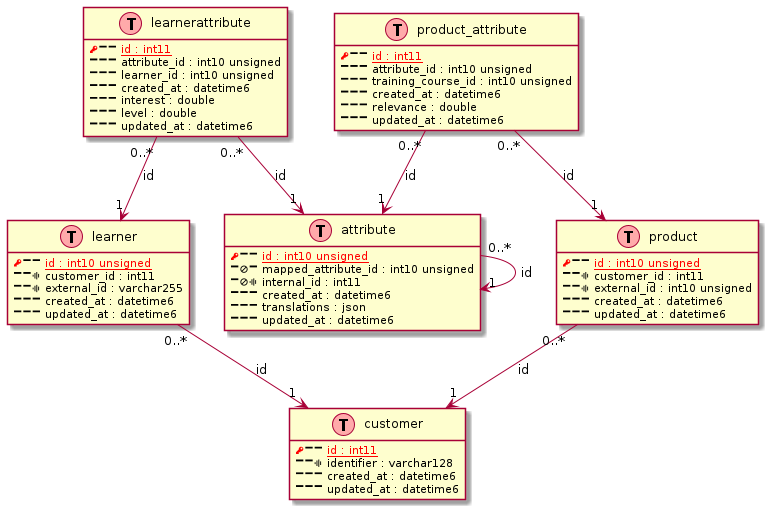
Plantuml diagram generated
@startuml
' uncomment the line below if you're using computer with a retina display
' skinparam dpi 300
!function Table($name)
  !return "class " + $name + " << (T,#FFAAAA) >>"
!endfunction
' we use bold for primary key
' green color for unique
' and underscore for not_null
!function column($name, $type, $null="", $pk="", $fk="", $unique="")
  !$label = ""

  ' Display key
  !if ($pk == "PK" && $fk != "FK")
    !$label = "<color:red><&key></color>"
  !elseif ($pk == "PK" && $fk == "FK")
    !$label = "<color:blue><&key></color>"
  !elseif ($fk == "FK")
    !$label = "<color:green><&key></color>"
  !else
    !$label = "<&minus>"
  !endif

  ' Display nullable icon
  !if ($null == "NULL")
    !$label = $label + "<&ban>"
  !else
    !$label = $label + "<&minus>"
  !endif

  ' Display unique icon
  !if ($unique == "UNIQUE")
    !$label = $label + "<&audio-spectrum>"
  !else
    !$label = $label + "<&minus>"
  !endif

  ' display label in the right color (PK, FK, both, none)
  !$label = $label + " "
  !$columnSpec = $name + " : " + $type
  !if ($pk == "PK" && $fk != "FK")
    !$label = $label + "<u><color:red>" + $columnSpec + "</color></u>"
  !elseif ($pk == "PK" && $fk == "FK")
    !$label = $label + "<u><color:blue>" + $columnSpec + "</color></u>"
  !elseif ($fk == "FK")
    !$label = $label + "<u><color:green>" + $columnSpec + "</color></u>"
  !else
    !$label = $label + $columnSpec
  !endif

  !return $label
!endfunction
' other tags available:
' <i></i>
' <back:COLOR></color>, where color is a color name or html color code
' (#FFAACC)
' see: http://plantuml.com/classes.html#More
hide methods
hide stereotypes
skinparam classAttributeIconSize 0

' entities
' entities
Table(customer) {
  column("id", "int11", "NOT NULL", "PK", "", "")
  column("identifier", "varchar128", "NOT NULL", "", "", "UNIQUE")
  column("created_at", "datetime6", "NOT NULL", "", "", "")
  column("updated_at", "datetime6", "NOT NULL", "", "", "")
}

Table(learner) {
  column("id", "int10 unsigned", "NOT NULL", "PK", "", "")
  column("customer_id", "int11", "NOT NULL", "", "", "UNIQUE")
  column("external_id", "varchar255", "NOT NULL", "", "", "UNIQUE")
  column("created_at", "datetime6", "NOT NULL", "", "", "")
  column("updated_at", "datetime6", "NOT NULL", "", "", "")
}
learner "0..*" --> "1" customer : "id"

Table(learner_attribute) {
  column("id", "int11", "NOT NULL", "PK", "", "")
  column("attribute_id", "int10 unsigned", "NOT NULL", "", "", "")
  column("learner_id", "int10 unsigned", "NOT NULL", "", "", "")
  column("created_at", "datetime6", "NOT NULL", "", "", "")
  column("interest", "double", "NOT NULL", "", "", "")
  column("level", "double", "NOT NULL", "", "", "")
  column("updated_at", "datetime6", "NOT NULL", "", "", "")
}
learner_attribute "0..*" --> "1" attribute : "id"
learner_attribute "0..*" --> "1" learner : "id"

Table(attribute) {
  column("id", "int10 unsigned", "NOT NULL", "PK", "", "")
  column("mapped_attribute_id", "int10 unsigned", "NULL", "", "", "")
  column("internal_id", "int11", "NULL", "", "", "UNIQUE")
  column("created_at", "datetime6", "NOT NULL", "", "", "")
  column("translations", "json", "NOT NULL", "", "", "")
  column("updated_at", "datetime6", "NOT NULL", "", "", "")
}
attribute "0..*" --> "1" attribute : "id"

Table(product) {
  column("id", "int10 unsigned", "NOT NULL", "PK", "", "")
  column("customer_id", "int11", "NOT NULL", "", "", "UNIQUE")
  column("external_id", "int10 unsigned", "NOT NULL", "", "", "UNIQUE")
  column("created_at", "datetime6", "NOT NULL", "", "", "")
  column("updated_at", "datetime6", "NOT NULL", "", "", "")
}
product "0..*" --> "1" customer : "id"

Table(product_attribute) {
  column("id", "int11", "NOT NULL", "PK", "", "")
  column("attribute_id", "int10 unsigned", "NOT NULL", "", "", "")
  column("training_course_id", "int10 unsigned", "NOT NULL", "", "", "")
  column("created_at", "datetime6", "NOT NULL", "", "", "")
  column("relevance", "double", "NOT NULL", "", "", "")
  column("updated_at", "datetime6", "NOT NULL", "", "", "")
}
product_attribute "0..*" --> "1" attribute : "id"
product_attribute "0..*" --> "1" product : "id"

@enduml
using plantuml software, here an example of resulting diagram
3. Git tools
3.1. bin/gitIsAncestorOf
SYNOPSIS:
    check if ref is inside a given branch.

USAGE: gitIsAncestorOf [OPTIONS] [ARGUMENTS]
USAGE: gitIsAncestorOf [--help|-h] [--config]
  [--bash-framework-config <bash-framework-config>] [--verbose|-v] [-vv] [-vvv]
  [--log-level <log-level>] [--log-file <log-file>]
  [--display-level <display-level>] [--no-color] [--theme <theme>] [--version]
  [--quiet|-q]

ARGUMENTS:
  claimedBranch {single} (mandatory)    The branch in which the ref will be searched.
  ref {single} (mandatory)    The ref to check.

GLOBAL OPTIONS:
  --help, -h {single}
    Displays this command help
  --config {single}
    Displays configuration
  --bash-framework-config <bash-framework-config> {single}
    Use alternate bash framework configuration.
  --verbose, -v {single}
    Info level verbose mode (alias of --display-level INFO)
  -vv {single}
    Debug level verbose mode (alias of --display-level DEBUG)
  -vvv {single}
    Trace level verbose mode (alias of --display-level TRACE)
  --log-level <log-level> {single}
    Set log level
    Possible values:
      - OFF
      - ERR
      - ERROR
      - WARN
      - WARNING
      - INFO
      - DEBUG
      - TRACE
    Default value: OFF
  --log-file <log-file> {single}
    Set log file
    Default value: /logs/bash.log
  --display-level <display-level> {single}
    Set display level
    Possible values:
      - OFF
      - ERR
      - ERROR
      - WARN
      - WARNING
      - INFO
      - DEBUG
      - TRACE
    Default value: INFO
  --no-color {single}
    Produce monochrome output. alias of --theme noColor.
  --theme <theme> {single}
    Choose color theme - default-force means colors will be produced even if
    command is piped.
    Possible values:
      - default
      - default-force
      - noColor
    Default value: default
  --version {single}
    Print version information and quit.
  --quiet, -q {single}
    Quiet mode, doesn't display any output.


DESCRIPTION:
  EXIT CODES:
    1: if commit does not exists
    2: if ref is not convertible to commit oid
    3: if commit is not included in given branch

VERSION: 3.0

AUTHOR: [François Chastanet](https://github.com/fchastanet)

SOURCE FILE: https://github.com/fchastanet/bash-tools-framework/tree/master/src/_binaries/Git/gitIsAncestorOf/gitIsAncestorOf-binary.yaml

LICENSE: MIT License
Copyright (c) 2020-now François Chastanet
3.2. bin/gitIsBranch
SYNOPSIS:
    Show an error if branchName is not a known branch.

USAGE: gitIsBranch [OPTIONS] [ARGUMENTS]
USAGE: gitIsBranch [--help|-h] [--config]
  [--bash-framework-config <bash-framework-config>] [--verbose|-v] [-vv] [-vvv]
  [--log-level <log-level>] [--log-file <log-file>]
  [--display-level <display-level>] [--no-color] [--theme <theme>] [--version]
  [--quiet|-q]

ARGUMENTS:
  branchName {single} (mandatory)    The branch name to check.

GLOBAL OPTIONS:
  --help, -h {single}
    Displays this command help
  --config {single}
    Displays configuration
  --bash-framework-config <bash-framework-config> {single}
    Use alternate bash framework configuration.
  --verbose, -v {single}
    Info level verbose mode (alias of --display-level INFO)
  -vv {single}
    Debug level verbose mode (alias of --display-level DEBUG)
  -vvv {single}
    Trace level verbose mode (alias of --display-level TRACE)
  --log-level <log-level> {single}
    Set log level
    Possible values:
      - OFF
      - ERR
      - ERROR
      - WARN
      - WARNING
      - INFO
      - DEBUG
      - TRACE
    Default value: OFF
  --log-file <log-file> {single}
    Set log file
    Default value: /logs/bash.log
  --display-level <display-level> {single}
    Set display level
    Possible values:
      - OFF
      - ERR
      - ERROR
      - WARN
      - WARNING
      - INFO
      - DEBUG
      - TRACE
    Default value: INFO
  --no-color {single}
    Produce monochrome output. alias of --theme noColor.
  --theme <theme> {single}
    Choose color theme - default-force means colors will be produced even if
    command is piped.
    Possible values:
      - default
      - default-force
      - noColor
    Default value: default
  --version {single}
    Print version information and quit.
  --quiet, -q {single}
    Quiet mode, doesn't display any output.


DESCRIPTION:
  EXIT CODES:
    1: if commit does not exists
    2: if ref is not convertible to commit oid
    3: if commit is not included in given branch

VERSION: 3.0

AUTHOR: [François Chastanet](https://github.com/fchastanet)

SOURCE FILE: https://github.com/fchastanet/bash-tools-framework/tree/master/src/_binaries/Git/gitIsBranch/gitIsBranch-binary.yaml

LICENSE: MIT License
Copyright (c) 2020-now François Chastanet
3.3. bin/gitRenameBranch
SYNOPSIS:
    Rename git local branch, push new branch and delete old branch.

USAGE: gitRenameBranch [OPTIONS] [ARGUMENTS]
USAGE: gitRenameBranch [--help|-h] [--config]
  [--bash-framework-config <bash-framework-config>] [--verbose|-v] [-vv] [-vvv]
  [--log-level <log-level>] [--log-file <log-file>]
  [--display-level <display-level>] [--no-color] [--theme <theme>] [--version]
  [--quiet|-q] [--assume-yes|--yes|-y] [--push|-p] [--delete|-d]

ARGUMENTS:
  newBranchName {single} (mandatory)    The new branch name.
  [oldBranchName {single}]    The name of the old branch if not current one.

GLOBAL OPTIONS:
  --help, -h {single}
    Displays this command help
  --config {single}
    Displays configuration
  --bash-framework-config <bash-framework-config> {single}
    Use alternate bash framework configuration.
  --verbose, -v {single}
    Info level verbose mode (alias of --display-level INFO)
  -vv {single}
    Debug level verbose mode (alias of --display-level DEBUG)
  -vvv {single}
    Trace level verbose mode (alias of --display-level TRACE)
  --log-level <log-level> {single}
    Set log level
    Possible values:
      - OFF
      - ERR
      - ERROR
      - WARN
      - WARNING
      - INFO
      - DEBUG
      - TRACE
    Default value: OFF
  --log-file <log-file> {single}
    Set log file
    Default value: /logs/bash.log
  --display-level <display-level> {single}
    Set display level
    Possible values:
      - OFF
      - ERR
      - ERROR
      - WARN
      - WARNING
      - INFO
      - DEBUG
      - TRACE
    Default value: INFO
  --no-color {single}
    Produce monochrome output. alias of --theme noColor.
  --theme <theme> {single}
    Choose color theme - default-force means colors will be produced even if
    command is piped.
    Possible values:
      - default
      - default-force
      - noColor
    Default value: default
  --version {single}
    Print version information and quit.
  --quiet, -q {single}
    Quiet mode, doesn't display any output.

OPTIONS:
  --assume-yes, --yes, -y {single}
    Do not ask for confirmation (use with caution).
    Automatic yes to prompts; assume "y" as answer to all prompts
    and run non-interactively.
  --push, -p {single}
    Push the new branch.
  --delete, -d {single}
    Delete the old remote branch.


DESCRIPTION:
  EXIT CODES:
  1 : if current directory is not a git repository
      or if invalid or missing arguments
  2 : if impossible to compute current branch name
  3 : master/main branch not supported by this command,
      please do it manually
  5 : New and old branch names are the same
  6 : You can use this tool in non interactive mode only
      if --assume-yes option is provided
  7 : if failed to rename local branch
  8 : if remote branch deletion failed
  9 : if failed to push the new branch


VERSION: 3.0

AUTHOR: [François Chastanet](https://github.com/fchastanet)

SOURCE FILE: https://github.com/fchastanet/bash-tools-framework/tree/master/src/_binaries/Git/gitRenameBranch/gitRenameBranch-binary.yaml

LICENSE: MIT License
Copyright (c) 2020-now François Chastanet
3.4. bin/upgradeGithubRelease
SYNOPSIS:
    Retrieve latest binary release from github and install it.

USAGE: upgradeGithubRelease [OPTIONS] [ARGUMENTS]
USAGE: upgradeGithubRelease [--help|-h] [--config]
  [--bash-framework-config <bash-framework-config>] [--verbose|-v] [-vv] [-vvv]
  [--log-level <log-level>] [--log-file <log-file>]
  [--display-level <display-level>] [--no-color] [--theme <theme>] [--version]
  [--quiet|-q] [--version-arg <versionArg>]
  [--current-version|-c <currentVersion>] [--exact-version|-e <exactVersion>]

ARGUMENTS:
  targetFile {single} (mandatory)    The binary downloaded will be written to this file path. Ensure the path
    is writable.
  githubUrlPattern {single} (mandatory)    The url pattern to use to download the binary, see examples below.
    @version@ is template variable that will be replaced by the latest
      version tag found on github.

GLOBAL OPTIONS:
  --help, -h {single}
    Displays this command help
  --config {single}
    Displays configuration
  --bash-framework-config <bash-framework-config> {single}
    Use alternate bash framework configuration.
  --verbose, -v {single}
    Info level verbose mode (alias of --display-level INFO)
  -vv {single}
    Debug level verbose mode (alias of --display-level DEBUG)
  -vvv {single}
    Trace level verbose mode (alias of --display-level TRACE)
  --log-level <log-level> {single}
    Set log level
    Possible values:
      - OFF
      - ERR
      - ERROR
      - WARN
      - WARNING
      - INFO
      - DEBUG
      - TRACE
    Default value: OFF
  --log-file <log-file> {single}
    Set log file
    Default value: /logs/bash.log
  --display-level <display-level> {single}
    Set display level
    Possible values:
      - OFF
      - ERR
      - ERROR
      - WARN
      - WARNING
      - INFO
      - DEBUG
      - TRACE
    Default value: INFO
  --no-color {single}
    Produce monochrome output. alias of --theme noColor.
  --theme <theme> {single}
    Choose color theme - default-force means colors will be produced even if
    command is piped.
    Possible values:
      - default
      - default-force
      - noColor
    Default value: default
  --version {single}
    Print version information and quit.
  --quiet, -q {single}
    Quiet mode, doesn't display any output.

VERSION MANAGEMENT:
  --version-arg <versionArg> {single}
    The argument that will be provided to the currently installed binary
    to check the version of the software. See options constraints below.

    Default value: --version
  --current-version, -c <currentVersion> {single}
    Sometimes the command to retrieve the version is complicated.
    Some command needs you to parse json or other commands
    that provides multiple sub command versions.
    In this case you can provide the version you currently have.
    See options constraints and examples below.
  --exact-version, -e <exactVersion> {single}
    If provided and currently installed binary is not this exactVersion,
    this exact version of the binary will be installed.
    See options constraints below.


DESCRIPTION:
  GITHUB TEMPLATE URLS EXAMPLES:

    Simple ones(Sometimes @version@ template variable has to be specified twice):
    "https://github.com/hadolint/hadolint/releases/download/v@version@/hadolint-Linux-x86_64"
    "https://github.com/koalaman/shellcheck/releases/download/v@version@/shellcheck-v@version@.linux.x86_64.tar.xz"
    "https://github.com/sharkdp/fd/releases/download/v@version@/fd_@version@_amd64.deb"
    "https://github.com/sharkdp/bat/releases/download/v@version@/bat_@version@_amd64.deb"
    "https://github.com/kubernetes-sigs/kind/releases/download/v@version@/kind-linux-amd64"
    "https://github.com/kubernetes/minikube/releases/download/v@version@/minikube-linux-amd64"
    "https://github.com/plantuml/plantuml/releases/download/v@version@/plantuml-@version@.jar"
    "https://github.com/Versent/saml2aws/releases/download/v@version@/saml2aws_@version@_linux_amd64.tar.gz"

    If you want to add a condition on architecture(linux, windows, x86, 64/32 bits):
    "https://github.com/docker/compose/releases/download/v@version@/docker-compose-$(uname -s | tr "[:upper:]" "[:lower:]")-$(uname -m)"
    "https://github.com/docker/docker-credential-helpers/releases/download/v@version@/docker-credential-wincred-v@version@.windows-$(dpkg --print-architecture).exe"
    "https://github.com/Blacksmoke16/oq/releases/download/v@version@/oq-v@version@-$(uname -s)-$(uname -m)"

  COMMAND EXAMPLES:

    Download docker-compose latest version
    upgradeGithubRelease /usr/local/bin/docker-compose \
      "https://github.com/docker/compose/releases/download/v@version@/docker-compose-$(uname -s | tr "[:upper:]" "[:lower:]")-$(uname -m)"

    Download oq specific version
    upgradeGithubRelease /usr/local/bin/oq --exact-version 1.3.4 \
      "https://github.com/Blacksmoke16/oq/releases/download/v@version@/oq-v@version@-$(uname -s)-$(uname -m)"

    Download oq specific version correctly retrieving the oq version and not the jq one
    upgradeGithubRelease /usr/local/bin/oq --exact-version 1.3.4 --version-arg '-V | grep oq:' \
      "https://github.com/Blacksmoke16/oq/releases/download/v@version@/oq-v@version@-$(uname -s)-$(uname -m)"


VERSION: 3.0

AUTHOR: [François Chastanet](https://github.com/fchastanet)

SOURCE FILE: https://github.com/fchastanet/bash-tools-framework/tree/master/src/_binaries/Git/upgradeGithubRelease/upgradeGithubRelease-binary.yaml

LICENSE: MIT License
Copyright (c) 2020-now François Chastanet
3.5. bin/githubReleaseManager
SYNOPSIS:
    Retrieve latest binary release from github and install it.

USAGE: githubReleaseManager [OPTIONS] [ARGUMENTS]
USAGE: githubReleaseManager [--help|-h] [--config]
  [--bash-framework-config <bash-framework-config>] [--verbose|-v] [-vv] [-vvv]
  [--log-level <log-level>] [--log-file <log-file>]
  [--display-level <display-level>] [--no-color] [--theme <theme>] [--version]
  [--quiet|-q] [--config-file|-c <configFile>]

ARGUMENTS:
  [softwareId {list} (optional)]    The specific software ids to install.
    If not provided, all the softwares specified in configuration
    file will be installed.


GLOBAL OPTIONS:
  --help, -h {single}
    Displays this command help
  --config {single}
    Displays configuration
  --bash-framework-config <bash-framework-config> {single}
    Use alternate bash framework configuration.
  --verbose, -v {single}
    Info level verbose mode (alias of --display-level INFO)
  -vv {single}
    Debug level verbose mode (alias of --display-level DEBUG)
  -vvv {single}
    Trace level verbose mode (alias of --display-level TRACE)
  --log-level <log-level> {single}
    Set log level
    Possible values:
      - OFF
      - ERR
      - ERROR
      - WARN
      - WARNING
      - INFO
      - DEBUG
      - TRACE
    Default value: OFF
  --log-file <log-file> {single}
    Set log file
    Default value: /logs/bash.log
  --display-level <display-level> {single}
    Set display level
    Possible values:
      - OFF
      - ERR
      - ERROR
      - WARN
      - WARNING
      - INFO
      - DEBUG
      - TRACE
    Default value: INFO
  --no-color {single}
    Produce monochrome output. alias of --theme noColor.
  --theme <theme> {single}
    Choose color theme - default-force means colors will be produced even if
    command is piped.
    Possible values:
      - default
      - default-force
      - noColor
    Default value: default
  --version {single}
    Print version information and quit.
  --quiet, -q {single}
    Quiet mode, doesn't display any output.

GITHUB RELEASE MANAGER OPTIONS:
  --config-file, -c <configFile> {single}
    The yaml configuration file to use.

    Default value: <currentDir>/githubReleaseManager.yaml


DESCRIPTION:

VERSION: 3.0

AUTHOR: [François Chastanet](https://github.com/fchastanet)

SOURCE FILE: https://github.com/fchastanet/bash-tools-framework/tree/master/src/_binaries/Git/githubReleaseManager/githubReleaseManager-binary.yaml

LICENSE: MIT License
Copyright (c) 2020-now François Chastanet
4. Dev tools
4.1. bin/cli
4.1.1. Help
SYNOPSIS:
    Easy connection to docker container.

USAGE: cli [OPTIONS] [ARGUMENTS]
USAGE: cli [--help|-h] [--config]
  [--bash-framework-config <bash-framework-config>] [--verbose|-v] [-vv] [-vvv]
  [--log-level <log-level>] [--log-file <log-file>]
  [--display-level <display-level>] [--no-color] [--theme <theme>] [--version]
  [--quiet|-q]

ARGUMENTS:
  [container {single}]    Container should be the name of a profile from profile list,
    check containers list below.

    If no value provided, it will load the container
    specified in default configuration.
    Default: project-apache2

  [user {single}]    user to connect on this container

    If no value provided, it will load the user
    specified in default configuration.
    Default: www-data

  [command {single}]    The command to execute

    If no value provided, it will load the command
    specified in default configuration.
    Default: /bin/bash


GLOBAL OPTIONS:
  --help, -h {single}
    Displays this command help
  --config {single}
    Displays configuration
  --bash-framework-config <bash-framework-config> {single}
    Use alternate bash framework configuration.
  --verbose, -v {single}
    Info level verbose mode (alias of --display-level INFO)
  -vv {single}
    Debug level verbose mode (alias of --display-level DEBUG)
  -vvv {single}
    Trace level verbose mode (alias of --display-level TRACE)
  --log-level <log-level> {single}
    Set log level
    Possible values:
      - OFF
      - ERR
      - ERROR
      - WARN
      - WARNING
      - INFO
      - DEBUG
      - TRACE
    Default value: OFF
  --log-file <log-file> {single}
    Set log file
    Default value: /logs/bash.log
  --display-level <display-level> {single}
    Set display level
    Possible values:
      - OFF
      - ERR
      - ERROR
      - WARN
      - WARNING
      - INFO
      - DEBUG
      - TRACE
    Default value: INFO
  --no-color {single}
    Produce monochrome output. alias of --theme noColor.
  --theme <theme> {single}
    Choose color theme - default-force means colors will be produced even if
    command is piped.
    Possible values:
      - default
      - default-force
      - noColor
    Default value: default
  --version {single}
    Print version information and quit.
  --quiet, -q {single}
    Quiet mode, doesn't display any output.


DESCRIPTION:
AVAILABLE PROFILES (from /bash/conf/cliProfiles)
This list can be overridden in /home/www-data/.bash-tools/cliProfiles

  - default
  - mysql
  - mysql.remote
  - node
  - redis
  - web

AVAILABLE CONTAINERS:

EXAMPLES:
    to connect to mysql container in bash mode with user mysql
        cli mysql-container-name mysql '/bin/bash'
    to connect to web container with user root
        cli web root


CREATE NEW PROFILE:
You can create new profiles in /home/www-data/.bash-tools/cliProfiles.
This script will be called with the
arguments userArg, containerArg, commandArg
The script has to compute the following
variables finalUserArg, finalContainerArg, finalCommandArg

VERSION: 3.0

AUTHOR: [François Chastanet](https://github.com/fchastanet)

SOURCE FILE: https://github.com/fchastanet/bash-tools-framework/tree/master/src/_binaries/Docker/cli/cli-binary.yaml

LICENSE: MIT License
Copyright (c) 2020-now François Chastanet
4.1.2. Example 1: open bash on a container named web
cli web
will actually execute this command :
MSYS_NO_PATHCONV=1 MSYS2_ARG_CONV_EXCL='\*'
docker exec -it -e COLUMNS="$(tput cols)" -e LINES="$(tput lines)" --user=
apache2 //bin/bash
4.1.3. Example 2: connect to mysql container with root user
cli mysql root bash
will actually execute this command :
MSYS_NO_PATHCONV=1 MSYS2_ARG_CONV_EXCL='\*'
docker exec -e COLUMNS="$(tput cols)" -e LINES="$(tput lines)" -it --user=root
project-mysql bash
4.1.4. Example 3: connect to mysql server in order to execute a query
will actually execute this command :
MSYS_NO_PATHCONV=1 MSYS2_ARG_CONV_EXCL='\*'
docker exec -it -e COLUMNS="$(tput cols)" -e LINES="$(tput lines)" --user=mysql
project-mysql //bin/bash -c 'mysql -h127.0.0.1 -uroot -proot -P3306'
4.1.5. Example 4: pipe sql command to mysql container
echo 'SELECT
  table_schema AS "Database",
  ROUND(SUM(data_length + index_length) / 1024 / 1024, 2) AS "Size (MB)"
FROM information_schema.TABLES' | bin/cli mysql
will actually execute this command :
MSYS_NO_PATHCONV=1 MSYS2_ARG_CONV_EXCL='\*'
docker exec -i -e COLUMNS="$(tput cols)" -e LINES="$(tput lines)" --user=mysql
project-mysql //bin/bash -c 'mysql -h127.0.0.1 -uroot -proot -P3306'
notice that as input is given to the command, tty option is not provided to docker exec
4.2. bin/postmanCli
4.2.1. Help
SYNOPSIS:
    Push/Pull postman collections of all the configured repositories.

USAGE: postmanCli [OPTIONS] [ARGUMENTS]
USAGE: postmanCli [--help|-h] [--config]
  [--bash-framework-config <bash-framework-config>] [--verbose|-v] [-vv] [-vvv]
  [--log-level <log-level>] [--log-file <log-file>]
  [--display-level <display-level>] [--no-color] [--theme <theme>] [--version]
  [--quiet|-q] [--postman-model|-m <configFile>]

ARGUMENTS:
  [command {single}]    pull
      Pull collections from Postman back to repositories.
    push
      Push repositories collections to Postman.
    Possible values:
      - pull: Pull
      - push: Push
  [ref {list} (optional)]    List of postman collection's references to pull or push
    or no argument to pull or push all the collections

GLOBAL OPTIONS:
  --help, -h {single}
    Displays this command help
  --config {single}
    Displays configuration
  --bash-framework-config <bash-framework-config> {single}
    Use alternate bash framework configuration.
  --verbose, -v {single}
    Info level verbose mode (alias of --display-level INFO)
  -vv {single}
    Debug level verbose mode (alias of --display-level DEBUG)
  -vvv {single}
    Trace level verbose mode (alias of --display-level TRACE)
  --log-level <log-level> {single}
    Set log level
    Possible values:
      - OFF
      - ERR
      - ERROR
      - WARN
      - WARNING
      - INFO
      - DEBUG
      - TRACE
    Default value: OFF
  --log-file <log-file> {single}
    Set log file
    Default value: /logs/bash.log
  --display-level <display-level> {single}
    Set display level
    Possible values:
      - OFF
      - ERR
      - ERROR
      - WARN
      - WARNING
      - INFO
      - DEBUG
      - TRACE
    Default value: INFO
  --no-color {single}
    Produce monochrome output. alias of --theme noColor.
  --theme <theme> {single}
    Choose color theme - default-force means colors will be produced even if
    command is piped.
    Possible values:
      - default
      - default-force
      - noColor
    Default value: default
  --version {single}
    Print version information and quit.
  --quiet, -q {single}
    Quiet mode, doesn't display any output.

PUSH/PULL OPTIONS:
  --postman-model, -m <configFile> {single}
    postmanCli model file to use
    Default value: <currentDir>/postmanCli.collections.json


DESCRIPTION:
  EXIT CODES:
    1: if commit does not exists
    2: if ref is not convertible to commit oid
    3: if commit is not included in given branch

VERSION: 3.0

AUTHOR: [François Chastanet](https://github.com/fchastanet)

SOURCE FILE: https://github.com/fchastanet/bash-tools-framework/tree/master/src/_binaries/Postman/postmanCli/postmanCli-binary.yaml

LICENSE: MIT License
Copyright (c) 2020-now François Chastanet
5. Database tools
5.1. bin/dbQueryAllDatabases
Execute a query on multiple database in order to generate a report, query can be parallelized on multiple databases
bin/dbQueryAllDatabases -e localhost-root conf/dbQueries/databaseSize.sql
5.1.1. Help
SYNOPSIS:
    Execute a query on multiple databases to generate a tsv format report.
    The query can be parallelized on multiple databases.


USAGE: dbQueryAllDatabases [OPTIONS] [ARGUMENTS]
USAGE: dbQueryAllDatabases [--jobs|-j <jobsCount>] [--bar|-b]
  [--from-dsn|-f <dsn>] [--help|-h] [--config]
  [--bash-framework-config <bash-framework-config>] [--verbose|-v] [-vv] [-vvv]
  [--log-level <log-level>] [--log-file <log-file>]
  [--display-level <display-level>] [--no-color] [--theme <theme>] [--version]
  [--quiet|-q] [--separator|-s <separator>]

ARGUMENTS:
  argQuery {single} (mandatory)    Query to execute
      - <file>, try to execute the mysql query
        provided by the file
      - <queryFile>, search for query file in
        queries directory (see below)
      - else the argument is interpreted as
        query string

JOB OPTIONS:
  --jobs, -j <jobsCount> {single}
    The number of databases to query in parallel.
    Default value: 1
  --bar, -b {single}
    Show progress as a progress bar. In the bar is shown: % of jobs
    completed, estimated seconds left, and number of jobs started.


SOURCE OPTIONS:
  --from-dsn, -f <dsn> {single}
    Target mysql server.

GLOBAL OPTIONS:
  --help, -h {single}
    Displays this command help
  --config {single}
    Displays configuration
  --bash-framework-config <bash-framework-config> {single}
    Use alternate bash framework configuration.
  --verbose, -v {single}
    Info level verbose mode (alias of --display-level INFO)
  -vv {single}
    Debug level verbose mode (alias of --display-level DEBUG)
  -vvv {single}
    Trace level verbose mode (alias of --display-level TRACE)
  --log-level <log-level> {single}
    Set log level
    Possible values:
      - OFF
      - ERR
      - ERROR
      - WARN
      - WARNING
      - INFO
      - DEBUG
      - TRACE
    Default value: OFF
  --log-file <log-file> {single}
    Set log file
    Default value: /logs/bash.log
  --display-level <display-level> {single}
    Set display level
    Possible values:
      - OFF
      - ERR
      - ERROR
      - WARN
      - WARNING
      - INFO
      - DEBUG
      - TRACE
    Default value: INFO
  --no-color {single}
    Produce monochrome output. alias of --theme noColor.
  --theme <theme> {single}
    Choose color theme - default-force means colors will be produced even if
    command is piped.
    Possible values:
      - default
      - default-force
      - noColor
    Default value: default
  --version {single}
    Print version information and quit.
  --quiet, -q {single}
    Quiet mode, doesn't display any output.

QUERY OPTIONS:
  --separator, -s <separator> {single}
    Character to use to separate mysql column.
    Default value: |


DESCRIPTION:
  Data Source Name (DSN)
    Default dsn directory:
      /bash/conf/dsn

    User dsn directory:
      /home/www-data/.bash-tools/dsn
      Allows to override dsn defined in "Default dsn directory"

    List of available dsn:
      - default.local
      - default.remote
      - localhost-root

  QUERIES
    Default queries directory:
      /bash/conf/dbQueries

    User queries directory:
      /home/www-data/.bash-tools/dbQueries
      Allows to override queries defined in 'Default queries directory'

    List of available queries:
      - databaseSize

  EXAMPLES:
    dbQueryAllDatabases databaseSize -j 12 --separator "|" --bar 2>/dev/null | column -s "|" -t -n -c 40

VERSION: 3.0

AUTHOR: [François Chastanet](https://github.com/fchastanet)

SOURCE FILE: https://github.com/fchastanet/bash-tools-framework/tree/master/src/_binaries/Database/dbQueryAllDatabases/dbQueryAllDatabases-binary.yaml

LICENSE: MIT License
Copyright (c) 2020-now François Chastanet
5.2. bin/dbScriptAllDatabases
Allow to execute a script on each database of specified mysql server
bin/dbScriptAllDatabases -d localhost-root dbCheckStructOneDatabase
or specified db only
bin/dbScriptAllDatabases -d localhost-root dbCheckStructOneDatabase db
launch script in parallel on multiple db at once
bin/dbScriptAllDatabases --jobs 10 -d localhost-root dbCheckStructOneDatabase
5.2.1. Help
SYNOPSIS:
    Allows to execute a script on each database of specified mysql server.


USAGE: dbScriptAllDatabases [OPTIONS] [ARGUMENTS]
USAGE: dbScriptAllDatabases [--jobs|-j <jobsCount>] [--bar|-b]
  [--from-dsn|-f <dsn>] [--help|-h] [--config]
  [--bash-framework-config <bash-framework-config>] [--verbose|-v] [-vv] [-vvv]
  [--log-level <log-level>] [--log-file <log-file>]
  [--display-level <display-level>] [--no-color] [--theme <theme>] [--version]
  [--quiet|-q] [--database <dbName>] [--output|-o <outputDirectory>]
  [--log-format|-l <logFormat>]

ARGUMENTS:
  scriptToExecute {single} (mandatory)    The script that will be executed on each databases.
  [scriptArguments {list} (optional)]    Optional parameters to pass to the script.

JOB OPTIONS:
  --jobs, -j <jobsCount> {single}
    The number of databases to query in parallel.
    Default value: 1
  --bar, -b {single}
    Show progress as a progress bar. In the bar is shown: % of jobs
    completed, estimated seconds left, and number of jobs started.


SOURCE OPTIONS:
  --from-dsn, -f <dsn> {single}
    Target mysql server.

GLOBAL OPTIONS:
  --help, -h {single}
    Displays this command help
  --config {single}
    Displays configuration
  --bash-framework-config <bash-framework-config> {single}
    Use alternate bash framework configuration.
  --verbose, -v {single}
    Info level verbose mode (alias of --display-level INFO)
  -vv {single}
    Debug level verbose mode (alias of --display-level DEBUG)
  -vvv {single}
    Trace level verbose mode (alias of --display-level TRACE)
  --log-level <log-level> {single}
    Set log level
    Possible values:
      - OFF
      - ERR
      - ERROR
      - WARN
      - WARNING
      - INFO
      - DEBUG
      - TRACE
    Default value: OFF
  --log-file <log-file> {single}
    Set log file
    Default value: /logs/bash.log
  --display-level <display-level> {single}
    Set display level
    Possible values:
      - OFF
      - ERR
      - ERROR
      - WARN
      - WARNING
      - INFO
      - DEBUG
      - TRACE
    Default value: INFO
  --no-color {single}
    Produce monochrome output. alias of --theme noColor.
  --theme <theme> {single}
    Choose color theme - default-force means colors will be produced even if
    command is piped.
    Possible values:
      - default
      - default-force
      - noColor
    Default value: default
  --version {single}
    Print version information and quit.
  --quiet, -q {single}
    Quiet mode, doesn't display any output.

SCRIPTS OPTIONS:
  --database <dbName> {list} (optional)
    If provided will check only databases specified,
    otherwise script will be executed on all dbs of mysql server.

  --output, -o <outputDirectory> {single}
    Output directory, see log-format option.
  --log-format, -l <logFormat> {single}
    If output dir provided, will log each db result to log file.
    Possible values:
      - none
      - log
    Default value: none


DESCRIPTION:
  Data Source Name (DSN)
    Default dsn directory:
      /bash/conf/dsn

    User dsn directory:
      /home/www-data/.bash-tools/dsn
      Allows to override dsn defined in "Default dsn directory"

    List of available dsn:
      - default.local
      - default.remote
      - localhost-root

  SCRIPTS
    Default scripts directory:
      /bash/conf/dbScripts

    User scripts directory:
      /home/www-data/.bash-tools/dbScripts
      Allows to override queries defined in 'Default scripts directory'

    List of available scripts:


  NOTE:
    the use of output, log-format, verbose options highly depends on the script used

  EXAMPLES: script conf/dbScripts/extractData.sh
    1. executes query databaseSize (see conf/dbQueries/databaseSize.sql) on each db and log the result in log file in default output dir, call it using
    ./dbScriptAllDatabases -j 10 extractData databaseSize

    2. executes query databaseSize on each db and display the result on stdout (2>/dev/null hides information messages)
    ./dbScriptAllDatabases -j 10 --log-format none extractData databaseSize

    3. use --verbose to get some debug information
    ./dbScriptAllDatabases -j 10 --log-format none --verbose extractData databaseSize

  USE CASES:
    you can use this script in order to check that each db model conforms with your ORM schema
    simply create a new script in conf/dbQueries that will call your orm schema checker

    update multiple db at once (simple to complex update script)

VERSION: 3.0

AUTHOR: [François Chastanet](https://github.com/fchastanet)

SOURCE FILE: https://github.com/fchastanet/bash-tools-framework/tree/master/src/_binaries/Database/dbScriptAllDatabases/dbScriptAllDatabases-binary.yaml

LICENSE: MIT License
Copyright (c) 2020-now François Chastanet
5.3. bin/dbImport
Import default source dsn/db ExampleDbName into default target dsn/db ExampleDbName
dbImport ExampleDbName
Ability to import db from dump stored on aws the dump file should have this name <fromDbName>.tar.gz and stored on AWS
location defined by S3_BASE_URL env variable (see src/_binaries/Database/dbImport/testsData/.env file)
dbImport --from-aws ExampleDbName.tar.gz
It allows also to dump from source database and import it into target database. Providing –profile option dumps only the tables selected. Providing –tables option imports only the tables selected.
The following command will dump full structure and data of fromDb but will insert only the data from tableA and tableB, full structure will be inserted too. Second call to this command skip the dump as dump has been saved the first time. Note that table A and table B are truncated on target database before being imported.
dbImport --from-dsn default.remote --target-dsn default.local -p all \
  fromDb targetDB --tables tableA,tableB
5.3.1. Help
SYNOPSIS:
    Import source db into target db using eventual table filter.

USAGE: dbImport [OPTIONS] [ARGUMENTS]
USAGE: dbImport [--collation-name|-o <targetDsn>] [--target-dsn|-t <targetDsn>]
  [--character-set|-c <characterSet>] [--profile|-p <profile>]
  [--tables <tablesSeparatedByComma>] [--skip-schema|-s] [--from-dsn|-f <dsn>]
  [--from-aws|-a <awsFile>] [--help|-h] [--config]
  [--bash-framework-config <bash-framework-config>] [--verbose|-v] [-vv] [-vvv]
  [--log-level <log-level>] [--log-file <log-file>]
  [--display-level <display-level>] [--no-color] [--theme <theme>] [--version]
  [--quiet|-q]

ARGUMENTS:
  fromDbName {single} (mandatory)    The name of the source/remote database.
  [<targetDbName> {single}]    The name of the target database
    Default value: <fromDbName>(without extension)


TARGET OPTIONS:
  --collation-name, -o <targetDsn> {single}
    Change the collation name used during database creation.
  --target-dsn, -t <targetDsn> {single}
    Dsn to use for target database.
    Default value: default.local
  --character-set, -c <characterSet> {single}
    Change the character set used during database creation.

PROFILE OPTIONS:
  --profile, -p <profile> {single}
    The name of the profile to use in order to
    include or exclude tables.
  --tables <tablesSeparatedByComma> {single}
    Import only table specified in the list.
    If aws mode, ignore profile option.


SOURCE OPTIONS:
  --skip-schema, -s {single}
    Avoids to import the schema.
  --from-dsn, -f <dsn> {single}
    target mysql server
  --from-aws, -a <awsFile> {single}
    db dump will be downloaded from s3 instead of using remote db.
    The value <awsFile> is the name of the file without s3 location
    (Only .gz or tar.gz file are supported).
    This option is incompatible with -f|--from-dsn option.


GLOBAL OPTIONS:
  --help, -h {single}
    Displays this command help
  --config {single}
    Displays configuration
  --bash-framework-config <bash-framework-config> {single}
    Use alternate bash framework configuration.
  --verbose, -v {single}
    Info level verbose mode (alias of --display-level INFO)
  -vv {single}
    Debug level verbose mode (alias of --display-level DEBUG)
  -vvv {single}
    Trace level verbose mode (alias of --display-level TRACE)
  --log-level <log-level> {single}
    Set log level
    Possible values:
      - OFF
      - ERR
      - ERROR
      - WARN
      - WARNING
      - INFO
      - DEBUG
      - TRACE
    Default value: OFF
  --log-file <log-file> {single}
    Set log file
    Default value: /logs/bash.log
  --display-level <display-level> {single}
    Set display level
    Possible values:
      - OFF
      - ERR
      - ERROR
      - WARN
      - WARNING
      - INFO
      - DEBUG
      - TRACE
    Default value: INFO
  --no-color {single}
    Produce monochrome output. alias of --theme noColor.
  --theme <theme> {single}
    Choose color theme - default-force means colors will be produced even if
    command is piped.
    Possible values:
      - default
      - default-force
      - noColor
    Default value: default
  --version {single}
    Print version information and quit.
  --quiet, -q {single}
    Quiet mode, doesn't display any output.


DESCRIPTION:
  Data Source Name (DSN)
    Default dsn directory:
      /bash/conf/dsn

    User dsn directory:
      /home/www-data/.bash-tools/dsn
      Allows to override dsn defined in "Default dsn directory"

    List of available dsn:
      - default.local
      - default.remote
      - localhost-root

    Aws s3 location:
      s3://example.com/exports/

  Profiles
    Default profiles directory:
      /bash/conf/dbImportProfiles

    User profiles directory:
      /home/www-data/.bash-tools/dbImportProfiles
      Allows to override profiles defined in "Default profiles directory"

    List of available profiles:
      - all
      - default
      - none

  Examples
    1. from one database to another one
    dbImport --from-dsn localhost --target-dsn remote fromDb toDb

    2. import from S3
    dbImport --from-aws awsFile.tar.gz --target-dsn localhost fromDb toDb

VERSION: 3.0

AUTHOR: [François Chastanet](https://github.com/fchastanet)

SOURCE FILE: https://github.com/fchastanet/bash-tools-framework/tree/master/src/_binaries/Database/dbImport/dbImport-binary.yaml

LICENSE: MIT License
Copyright (c) 2020-now François Chastanet
5.4. bin/dbImportProfile
Import remote db into local db
dbImportProfile --from-dsn default.local MY_DB --ratio 45
Ability to generate profile that can be used in dbImport to filter out tables bigger than given ratio (based on biggest
table size). Profile is automatically saved in ${HOME}/.bash-tools/dbImportProfiles with this format auto*<dsn>*<db>
eg: auto_default.local_MY_DB
5.4.1. Help
SYNOPSIS:
    Generate optimized profiles to be used by dbImport.

USAGE: dbImportProfile [OPTIONS] [ARGUMENTS]
USAGE: dbImportProfile [--ratio|-r <ratio>] [--profile|-p <profile>]
  [--from-dsn|-f <dsn>] [--help|-h] [--config]
  [--bash-framework-config <bash-framework-config>] [--verbose|-v] [-vv] [-vvv]
  [--log-level <log-level>] [--log-file <log-file>]
  [--display-level <display-level>] [--no-color] [--theme <theme>] [--version]
  [--quiet|-q]

ARGUMENTS:
  fromDbName {single} (mandatory)    The name of the source/remote database.

PROFILE OPTIONS:
  --ratio, -r <ratio> {single}
    define the ratio to use (0 to 100% - default 70).
      - 0 means profile will filter out all the tables.
      - 100 means profile will keep all the tables.
    Eg: 70 means that tables with size(table+index)
    that are greater than 70% of the max table size
    will be excluded.
    Default value: 70
  --profile, -p <profile> {single}
    The name of the profile to use in order to
    include or exclude tables.

SOURCE OPTIONS:
  --from-dsn, -f <dsn> {single}
    Target mysql server.

GLOBAL OPTIONS:
  --help, -h {single}
    Displays this command help
  --config {single}
    Displays configuration
  --bash-framework-config <bash-framework-config> {single}
    Use alternate bash framework configuration.
  --verbose, -v {single}
    Info level verbose mode (alias of --display-level INFO)
  -vv {single}
    Debug level verbose mode (alias of --display-level DEBUG)
  -vvv {single}
    Trace level verbose mode (alias of --display-level TRACE)
  --log-level <log-level> {single}
    Set log level
    Possible values:
      - OFF
      - ERR
      - ERROR
      - WARN
      - WARNING
      - INFO
      - DEBUG
      - TRACE
    Default value: OFF
  --log-file <log-file> {single}
    Set log file
    Default value: /logs/bash.log
  --display-level <display-level> {single}
    Set display level
    Possible values:
      - OFF
      - ERR
      - ERROR
      - WARN
      - WARNING
      - INFO
      - DEBUG
      - TRACE
    Default value: INFO
  --no-color {single}
    Produce monochrome output. alias of --theme noColor.
  --theme <theme> {single}
    Choose color theme - default-force means colors will be produced even if
    command is piped.
    Possible values:
      - default
      - default-force
      - noColor
    Default value: default
  --version {single}
    Print version information and quit.
  --quiet, -q {single}
    Quiet mode, doesn't display any output.


DESCRIPTION:
  Data Source Name (DSN)
    Default dsn directory:
      /bash/conf/dsn

    User dsn directory:
      /home/www-data/.bash-tools/dsn
      Allows to override dsn defined in "Default dsn directory"

    List of available dsn:
      - default.local
      - default.remote
      - localhost-root

  Profiles
    Default profiles directory:
      /bash/conf/dbImportProfiles

    User profiles directory:
      /home/www-data/.bash-tools/dbImportProfiles
      Allows to override profiles defined in "Default profiles directory"

    List of available profiles:
      - all
      - default
      - none

VERSION: 3.0

AUTHOR: [François Chastanet](https://github.com/fchastanet)

SOURCE FILE: https://github.com/fchastanet/bash-tools-framework/tree/master/src/_binaries/Database/dbImportProfile/dbImportProfile-binary.yaml

LICENSE: MIT License
Copyright (c) 2021-now François Chastanet
5.5. bin/dbImportStream
SYNOPSIS:
    Stream tar.gz file or gz file through mysql.

USAGE: dbImportStream [OPTIONS] [ARGUMENTS]
USAGE: dbImportStream [--profile|-p <profile>]
  [--tables <tablesSeparatedByComma>] [--target-dsn|-t <targetDsn>]
  [--character-set|-c <characterSet>] [--help|-h] [--config]
  [--bash-framework-config <bash-framework-config>] [--verbose|-v] [-vv] [-vvv]
  [--log-level <log-level>] [--log-file <log-file>]
  [--display-level <display-level>] [--no-color] [--theme <theme>] [--version]
  [--quiet|-q]

ARGUMENTS:
  argDumpFile {single} (mandatory)    The file that will be streamed through mysql.
  argTargetDbName {single} (mandatory)    The name of the mysql target database.

PROFILE OPTIONS:
  --profile, -p <profile> {single}
    The name of the profile to use in order to
    include or exclude tables.
  --tables <tablesSeparatedByComma> {single}
    Import only table specified in the list.
    If aws mode, ignore profile option.


TARGET OPTIONS:
  --target-dsn, -t <targetDsn> {single}
    Dsn to use for target database.
    Default value: default.local
  --character-set, -c <characterSet> {single}
    Change the character set used during database creation.

GLOBAL OPTIONS:
  --help, -h {single}
    Displays this command help
  --config {single}
    Displays configuration
  --bash-framework-config <bash-framework-config> {single}
    Use alternate bash framework configuration.
  --verbose, -v {single}
    Info level verbose mode (alias of --display-level INFO)
  -vv {single}
    Debug level verbose mode (alias of --display-level DEBUG)
  -vvv {single}
    Trace level verbose mode (alias of --display-level TRACE)
  --log-level <log-level> {single}
    Set log level
    Possible values:
      - OFF
      - ERR
      - ERROR
      - WARN
      - WARNING
      - INFO
      - DEBUG
      - TRACE
    Default value: OFF
  --log-file <log-file> {single}
    Set log file
    Default value: /logs/bash.log
  --display-level <display-level> {single}
    Set display level
    Possible values:
      - OFF
      - ERR
      - ERROR
      - WARN
      - WARNING
      - INFO
      - DEBUG
      - TRACE
    Default value: INFO
  --no-color {single}
    Produce monochrome output. alias of --theme noColor.
  --theme <theme> {single}
    Choose color theme - default-force means colors will be produced even if
    command is piped.
    Possible values:
      - default
      - default-force
      - noColor
    Default value: default
  --version {single}
    Print version information and quit.
  --quiet, -q {single}
    Quiet mode, doesn't display any output.


DESCRIPTION:
  Data Source Name (DSN)
    Default dsn directory:
      /bash/conf/dsn

    User dsn directory:
      /home/www-data/.bash-tools/dsn
      Allows to override dsn defined in "Default dsn directory"

    List of available dsn:
      - default.local
      - default.remote
      - localhost-root

  Profiles
    Default profiles directory:
      /bash/conf/dbImportProfiles

    User profiles directory:
      /home/www-data/.bash-tools/dbImportProfiles
      Allows to override profiles defined in "Default profiles directory"

    List of available profiles:
      - all
      - default
      - none

VERSION: 3.0

AUTHOR: [François Chastanet](https://github.com/fchastanet)

SOURCE FILE: https://github.com/fchastanet/bash-tools-framework/tree/master/src/_binaries/Database/dbImportStream/dbImportStream-binary.yaml

LICENSE: MIT License
Copyright (c) 2020-now François Chastanet