How to Write Jenkinsfiles
Comprehensive guide to writing Jenkins pipelines and Jenkinsfiles
This section provides comprehensive guides for writing Jenkinsfiles and working with Jenkins pipelines.
This is a complete guide covering Jenkins architecture, pipeline syntax, shared libraries, best practices, and annotated
examples.
1. What You’ll Learn
- How Jenkins works and its architecture
- Declarative and scripted pipeline syntax
- Creating and using Jenkins shared libraries
- Jenkins best practices and configuration
- Real-world Jenkinsfile examples with detailed annotations
- Common recipes and troubleshooting tips
1 - How Jenkins Works
Understanding Jenkins architecture and concepts
Source: https://www.jenkins.io/doc/book/managing/nodes/
Source glossary: https://www.jenkins.io/doc/book/glossary/
1. Jenkins Master Slave Architecture

The Jenkins controller is the master node which is able to launch jobs on different nodes (machines)
directed by an Agent. The Agent can the use one or several executors to execute the job(s) depending on
configuration.
Jenkins is using Master/Slave architecture with the following components:
1.1. Jenkins controller/Jenkins master node
The central, coordinating process which stores configuration, loads plugins, and renders the various user interfaces
for Jenkins.
The Jenkins controller is the Jenkins service itself and is where Jenkins is installed. It is a webserver that also acts
as a “brain” for deciding how, when and where to run tasks. Management tasks (configuration, authorization, and
authentication) are executed on the controller, which serves HTTP requests. Files written when a Pipeline executes are
written to the filesystem on the controller unless they are off-loaded to an artifact repository such as Nexus or
Artifactory.
1.2. Nodes
A machine which is part of the Jenkins environment and capable of executing
Pipelines or
jobs. Both the
Controller and
Agents are considered to be Nodes.
Nodes are the “machines” on which build agents run. Jenkins monitors each attached node for disk space, free temp
space, free swap, clock time/sync and response time. A node is taken offline if any of these values go outside the
configured threshold.
The Jenkins controller itself runs on a special built-in node. It is possible to run agents and executors on this
built-in node although this can degrade performance, reduce scalability of the Jenkins instance, and create serious
security problems and is strongly discouraged, especially for production environments.
1.3. Agents
An agent is typically a machine, or container, which connects to a Jenkins controller and executes tasks when directed
by the controller.
Agents manage the task execution on behalf of the Jenkins controller by using executors. An agent is actually a small
(170KB single jar) Java client process that connects to a Jenkins controller and is assumed to be unreliable. An agent
can use any operating system that supports Java. Tools required for builds and tests are installed on the node where the
agent runs; they can be installed directly or in a container (Docker or Kubernetes). Each agent is effectively a process
with its own PID (Process Identifier) on the host machine.
In practice, nodes and agents are essentially the same but it is good to remember that they are conceptually distinct.
1.4. Executors
A slot for execution of work defined by a Pipeline or
job on a Node. A
Node may have zero or more Executors configured which corresponds to how many concurrent Jobs or Pipelines are able to
execute on that Node.
An executor is a slot for execution of tasks; effectively, it is a thread in the agent. The number of executors on a
node defines the number of concurrent tasks that can be executed on that node at one time. In other words, this
determines the number of concurrent Pipeline stages that can execute on that node at one time.
The proper number of executors per build node must be determined based on the resources available on the node and the
resources required for the workload. When determining how many executors to run on a node, consider CPU and memory
requirements as well as the amount of I/O and network activity:
- One executor per node is the safest configuration.
- One executor per CPU core may work well if the tasks being run are small.
- Monitor I/O performance, CPU load, memory usage, and I/O throughput carefully when running multiple executors on a
node.
1.5. Jobs
A user-configured description of work which Jenkins should perform, such as building a piece of software, etc.
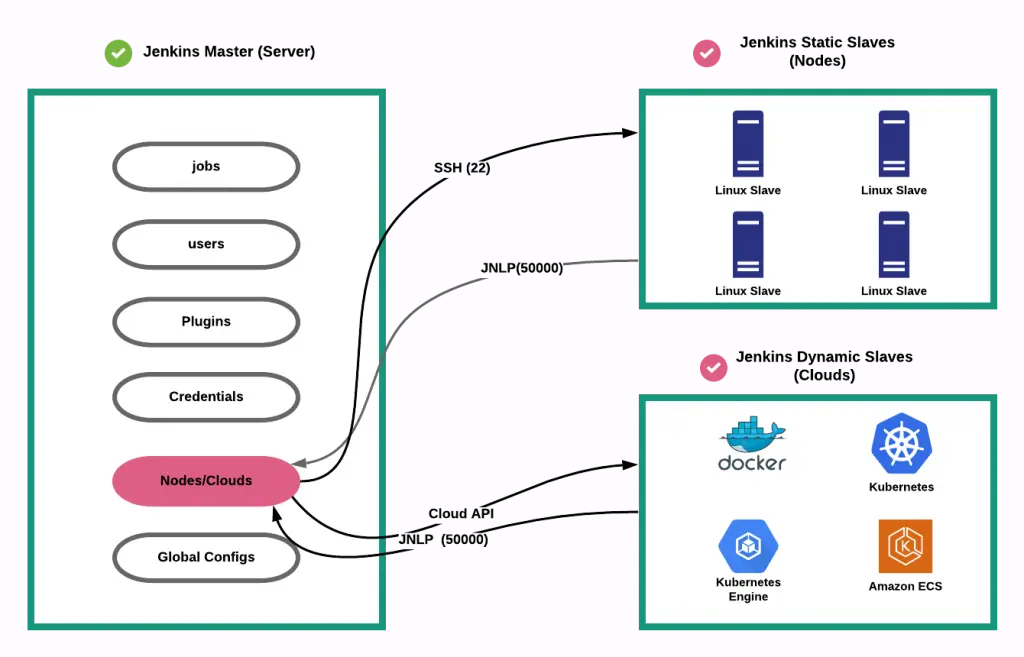
2. Jenkins dynamic node
Jenkins has static slave nodes and can trigger the generation of dynamic slave nodes
2 - Jenkins Pipelines
Declarative and scripted pipeline syntax
1. What is a pipeline ?
https://www.jenkins.io/doc/book/pipeline/
Jenkins Pipeline (or simply “Pipeline” with a capital “P”) is a suite of plugins which supports implementing and
integrating continuous delivery pipelines into Jenkins.
A continuous delivery (CD) pipeline is an automated expression of your process for getting software from version
control right through to your users and customers. Every change to your software (committed in source control) goes
through a complex process on its way to being released. This process involves building the software in a reliable and
repeatable manner, as well as progressing the built software (called a “build”) through multiple stages of testing and
deployment.
Pipeline provides an extensible set of tools for modeling simple-to-complex delivery pipelines “as code” via the
Pipeline domain-specific language (DSL) syntax.
View footnote 1
The definition of a Jenkins Pipeline is written into a text file (called a
Jenkinsfile) which in turn can be committed to a project’s
source control repository.
View footnote 2 This is the foundation of
“Pipeline-as-code”; treating the CD pipeline a part of the application to be versioned and reviewed like any other
code.
2. Pipeline creation via UI
it’s not recommended but it’s possible to create a pipeline via the UI.
There are several drawbacks:
- no code revision
- difficult to read, understand
3. Groovy
Scripted and declarative pipelines are using groovy language.
Checkout https://www.guru99.com/groovy-tutorial.html to have a quick
overview of this derived language check Wikipedia
4. Difference between scripted pipeline (freestyle) and declarative pipeline syntax
What are the main differences ? Here are some of the most important things you should know:
- Basically, declarative and scripted pipelines differ in terms of the programmatic approach. One uses a declarative
programming model and the second uses an imperative programming mode.
- Declarative pipelines break down stages into multiple steps, while in scripted pipelines there is no need for this.
Example below
Declarative and Scripted Pipelines are constructed fundamentally differently. Declarative Pipeline is a more recent
feature of Jenkins Pipeline which:
- provides richer syntactical features over Scripted Pipeline syntax, and
- is designed to make writing and reading Pipeline code easier.
- By default automatically checkout stage
Many of the individual syntactical components (or “steps”) written into a Jenkinsfile, however, are common to both
Declarative and Scripted Pipeline. Read more about how these two types of syntax differ in
Pipeline concepts and
Pipeline syntax overview.
5. Declarative pipeline example
Pipeline syntax documentation
 pipeline {
   agent {
     // executed on an executor with the label 'some-label'
     // or 'docker', the label normally specifies:
     // - the size of the machine to use
     //   (eg.: Docker-C5XLarge used for build that needs a powerful machine)
     // - the features you want in your machine
     //   (eg.: docker-base-ubuntu an image with docker command available)
     label "some-label"
   }

   stages {
     stage("foo") {
       steps {
         // variable assignment and Complex global
         // variables (with properties or methods)
         // can only be done in a script block
         script {
           foo = docker.image('ubuntu')
           env.bar = "${foo.imageName()}"
           echo "foo: ${foo.imageName()}"
         }
       }
     }
     stage("bar") {
       steps{
         echo "bar: ${env.bar}"
         echo "foo: ${foo.imageName()}"
       }
     }
   }
 }
6. Scripted pipeline example
Scripted pipelines permit a developer to inject code, while the declarative Jenkins pipeline doesn’t. should be
avoided actually, try to use jenkins library instead
node {

  git url: 'https://github.com/jfrogdev/project-examples.git'

  // Get Artifactory server instance, defined in the Artifactory Plugin
  // administration page.
  def server = Artifactory.server "SERVER_ID"

  // Read the upload spec and upload files to Artifactory.
  def downloadSpec =
       '''{
       "files": [
         {
            "pattern": "libs-snapshot-local/*.zip",
            "target": "dependencies/",
            "props": "p1=v1;p2=v2"
         }
       ]
   }'''

  def buildInfo1 = server.download spec: downloadSpec

  // Read the upload spec which was downloaded from github.
  def uploadSpec =
     '''{
     "files": [
       {
          "pattern": "resources/Kermit.*",
          "target": "libs-snapshot-local",
          "props": "p1=v1;p2=v2"
       },
       {
          "pattern": "resources/Frogger.*",
          "target": "libs-snapshot-local"
       }
      ]
   }'''


  // Upload to Artifactory.
  def buildInfo2 = server.upload spec: uploadSpec

  // Merge the upload and download build-info objects.
  buildInfo1.append buildInfo2

  // Publish the build to Artifactory
  server.publishBuildInfo buildInfo1
}
7. Why Pipeline?
Jenkins is, fundamentally, an automation engine which supports a number of automation patterns. Pipeline adds a powerful
set of automation tools onto Jenkins, supporting use cases that span from simple continuous integration to comprehensive
CD pipelines. By modeling a series of related tasks, users can take advantage of the many features of Pipeline:
- Code: Pipelines are implemented in code and typically checked into source control, giving teams the ability to
edit, review, and iterate upon their delivery pipeline.
- Durable: Pipelines can survive both planned and unplanned restarts of the Jenkins controller.
- Pausable: Pipelines can optionally stop and wait for human input or approval before continuing the Pipeline run.
- Versatile: Pipelines support complex real-world CD requirements, including the ability to fork/join, loop, and
perform work in parallel.
- Extensible: The Pipeline plugin supports custom extensions to its DSL
see jenkins doc and multiple options for integration with
other plugins.
While Jenkins has always allowed rudimentary forms of chaining Freestyle Jobs together to perform sequential tasks,
see jenkins doc Pipeline makes this concept a first-class
citizen in Jenkins.
More information on Official jenkins documentation - Pipeline
3 - Jenkins Library
Creating and using Jenkins shared libraries
1. What is a jenkins shared library ?
As Pipeline is adopted for more and more projects in an organization, common patterns are likely to emerge. Oftentimes
it is useful to share parts of Pipelines between various projects to reduce redundancies and keep code “DRY”
for more information check pipeline shared libraries
2. Loading libraries dynamically
As of version 2.7 of the Pipeline: Shared Groovy Libraries plugin, there is a new option for loading (non-implicit)
libraries in a script: a library step that loads a library dynamically, at any time during the build.
If you are only interested in using global variables/functions (from the vars/ directory), the syntax is quite simple:
library 'my-shared-library'
Thereafter, any global variables from that library will be accessible to the script.
3. jenkins library directory structure
The directory structure of a Shared Library repository is as follows:
(root)
+- src        # Groovy source files
|   +- org
|       +- foo
|           +- Bar.groovy  # for org.foo.Bar class
|
+- vars       # The vars directory hosts script
              # files that are exposed as a variable in Pipelines
|   +- foo.groovy          # for global 'foo' variable
|   +- foo.txt             # help for 'foo' variable
|
+- resources  # resource files (external libraries only)
|   +- org
|      +- foo
|         +- bar.json      # static helper data for org.foo.Bar
4. Jenkins library
remember that jenkins library code is executed on master node
if you want to execute code on the node, you need to use jenkinsExecutor
usage of jenkins executor
String credentialsId = 'babee6c1-14fe-4d90-9da0-ffa7068c69af'
def lib = library(
    identifier: 'jenkins_library@v1.0',
    retriever: modernSCM([
        $class: 'GitSCMSource',
        remote: 'git@github.com:fchastanet/jenkins-library.git',
        credentialsId: credentialsId
    ])
)
// this is the jenkinsExecutor instance
def docker = lib.fchastanet.Docker.new(this)
Then in the library, it is used like this:
def status = this.jenkinsExecutor.sh(
  script: "docker pull ${cacheTag}", returnStatus: true
)
5. Jenkins library structure
I remarked that a lot of code was duplicated between all my Jenkinsfiles so I created this library
https://github.com/fchastanet/jenkins-library
(root)
+- doc    # markdown files automatically generated
          # from groovy files by generateDoc.sh
+- src    # Groovy source files
|   +- fchastanet
|       +- Cloudflare.groovy     # zonePurge
|       +- Docker.groovy         # getTagCompatibleFromBranch
                                 # pullBuildPushImage, ...
|       +- Git.groovy            # getRepoURL, getCommitSha,
                                 # getLastPusherEmail,
                                 # updateConditionalGithubCommitStatus
|       +- Kubernetes.groovy     # deployHelmChart, ...
|       +- Lint.groovy           # dockerLint,
                                 # transform lighthouse report
                                 # to Warnings NG issues format
|       +- Mail.groovy           # sendTeamsNotification,
                                 # sendConditionalEmail, ...
|       +- Utils.groovy          # deepMerge, isCollectionOrArray,
                                 # deleteDirAsRoot,
                                 # initAws (could be moved to Aws class)
+- vars   # The vars directory hosts script files that
          # are exposed as a variable in Pipelines
|   +- dockerPullBuildPush.groovy #
|   +- whenOrSkip.groovy          #
6. external resource usage
If you need you check out how I used this repository https://github.com/fchastanet/jenkins-library-resources in
jenkins_library (Linter) that hosts some resources to parse result files.
4 - Jenkins Best Practices
Best practices and patterns for Jenkins and Jenkinsfiles
1. Pipeline best practices
Official Jenkins pipeline best practices
Summary:
- Make sure to use Groovy code in Pipelines as glue
- Externalize shell scripts from Jenkins Pipeline
- for better jenkinsfile readability
- in order to test the scripts isolated from jenkins
- Avoid complex Groovy code in Pipelines
- Groovy code always executes on controller which means using controller resources(memory and CPU)
- it is not the case for shell scripts
- eg1: prefer using jq inside shell script instead of groovy JsonSlurper
- eg2: prefer calling curl instead of groovy http request
- Reducing repetition of similar Pipeline steps (eg: one sh step instead of severals)
- group similar steps together to avoid step creation/destruction overhead
- Avoiding calls to Jenkins.getInstance
2. Shared library best practices
Official Jenkins shared libraries best practices
Summary:
- Do not override built-in Pipeline steps
- Avoiding large global variable declaration files
- Avoiding very large shared libraries
And:
- import jenkins library using a tag
- like in docker build, npm package with package-lock.json or python pip lock, it’s advised to target a given version
of the library
- because some changes could break
- The missing part: we miss on this library unit tests
- but each pipeline is a kind of integration test
- Because a pipeline can be
resumed, your
library’s classes should implement Serializable class and the following attribute has to be provided:
private static final long serialVersionUID = 1L
5 - Annotated Jenkinsfiles - Part 1
Detailed Jenkinsfile examples with annotations
Pipeline example
1. Simple one
This build is used to generate docker images used to build production code and launch phpunit tests. This pipeline is
parameterized in the Jenkins UI directly with the parameters:
- branch (git branch to use)
- environment(select with 3 options: build, phpunit or all)
- it would have been better to use simply 2 checkboxes phpunit/build
- project_branch
Here the source code with inline comments:
Annotated jenkinsfile Expand source
// This method allows to convert the branch name to a docker image tag.
// This method is generally used by most of my jenkins pipelines, it's why it has been added to https://github.com/fchastanet/jenkins-library/blob/master/src/fchastanet/Docker.groovy#L31
def getTagCompatibleFromBranch(String branchName) {
    def String tag = branchName.toLowerCase()
    tag = tag.replaceAll("^origin/", "")
    return tag.replaceAll('/', '_')
}

// we declare here some variables that will be used in next stages
def String deploymentBranchTagCompatible = ''

pipeline {
    agent {
        node {
            // the pipeline is executed on a machine with docker daemon
            // available
            label 'docker-ubuntu'
        }
    }

    stages {
        stage ('checkout') {
            steps {
                // this command is actually not necessary because checkout is
                // done automatically when using declarative pipeline
                sh 'echo "pulling ... ${GIT_BRANCH#origin/}"'
                checkout scm

                // this particular build needs to access to some private github
                // repositories, so here we are copying the ssh key
                // it would be better to use new way of injecting ssh key
                // inside docker using sshagent
                // check https://stackoverflow.com/a/66897280
                withCredentials([
                    sshUserPrivateKey(
                      credentialsId: '855aad9f-1b1b-494c-aa7f-4de881c7f659',
                      keyFileVariable: 'sshKeyFile'
                   )
                ]) {
                    // best practice similar steps should be merged into one
                    sh 'rm -f ./phpunit/id_rsa'
                    sh 'rm -f ./build/id_rsa'
                    // here we are escaping '$' so the variable will be
                    // interpolated on the jenkins slave and not the jenkins
                    // master node instead of escaping, we could have used
                    // single quotes
                    sh "cp \$sshKeyFile ./phpunit/id_rsa"
                    sh "cp \$sshKeyFile ./build/id_rsa"
                }
                script {
                    // as actually scm is already done before executing the
                    // first step, this call could have been done during
                    // declaration of this variable
                    deploymentBranchTagCompatible = getTagCompatibleFromBranch(GIT_BRANCH)
                }
            }
        }
        stage("build Build env") {
            when {
                // the build can be launched with the parameter environment
                // defined in the configuration of the jenkins job, these
                // parameters could have been defined directly in the pipeline
                // see https://www.jenkins.io/doc/book/pipeline/syntax/#parameters
                expression { return params.environment != "phpunit"}
            }
            steps {
                // here we could have launched all this commands in the same sh
                // directive
                sh "docker build --build-arg BRANCH=${params.project_branch} -t build build"
                // use a constant for dockerRegistryId.dkr.ecr.eu-west-1.amazonaws.com
                sh "docker tag build dockerRegistryId.dkr.ecr.eu-west-1.amazonaws.com/build:${deploymentBranchTagCompatible}"
                sh "docker push dockerRegistryId.dkr.ecr.eu-west-1.amazonaws.com/build:${deploymentBranchTagCompatible}"
            }
        }
        stage("build PHPUnit env") {
            when {
                // it would have been cleaner to use
                // expression { return params.environment = "phpunit"}
                expression { return params.environment != "build"}
            }
            steps {
                sh "docker build --build-arg BRANCH=${params.project_branch} -t phpunit phpunit"
                sh "docker tag phpunit dockerRegistryId.dkr.ecr.eu-west-1.amazonaws.com/phpunit:${deploymentBranchTagCompatible}"
                sh "docker push dockerRegistryId.dkr.ecr.eu-west-1.amazonaws.com/phpunit:${deploymentBranchTagCompatible}"
            }
        }
    }
}
without seeing the Dockerfile files, we can advise :
- to build these images in the same pipeline where build and phpunit are run
- the images are built at the same time so we are sure that we are using the right version
- apparently the docker build depend on the branch of the project, this should be avoided
- ssh key is used in docker image, that could lead to a security issue as ssh key is still in the history of images
layers even if it has been removed in subsequent layers, check https://stackoverflow.com/a/66897280 for information
on how to use ssh-agent instead
- we could use a single Dockerfile with 2 stages:
- one stage to generate production image
- one stage that inherits production stage, used to execute phpunit
- it has the following advantages :
- reduce the total image size because of the reuse different docker image layers
- only one Dockerfile to maintain
2. More advanced and annotated Jenkinsfiles
6 - Annotated Jenkinsfiles - Part 2
More annotated Jenkinsfile examples
1. Introduction
This example is missing the use of parameters, jenkins library in order to reuse common code
This example uses :
- post conditions
https://www.jenkins.io/doc/book/pipeline/syntax/#post
- github plugin to set commit status indicating the result of the build
- usage of several jenkins plugins, you can check here to get the full list installed on your server and even
generate code snippets by adding pipeline-syntax/ to your jenkins server url
But it misses:
check Pipeline syntax documentation
2. Annotated Jenkinsfile
// Define variables for QA environment
def String registry_id = 'awsAccountId'
def String registry_url = registry_id + '.dkr.ecr.us-east-1.amazonaws.com'
def String image_name = 'project'
def String image_fqdn_master = registry_url + '/' + image_name + ':master'
def String image_fqdn_current_branch = image_fqdn_master

// this method is used by several of my pipelines and has been added
// to jenkins_library <https://github.com/fchastanet/jenkins-library/blob/master/src/fchastanet/Git.groovy#L156>
void publishStatusToGithub(String status) {
  step([
    $class: "GitHubCommitStatusSetter",
    reposSource: [$class: "ManuallyEnteredRepositorySource", url: "https://github.com/fchastanet/project"],
    errorHandlers: [[$class: 'ShallowAnyErrorHandler']],
    statusResultSource: [
      $class: 'ConditionalStatusResultSource',
      results: [
        [$class: 'AnyBuildResult', state: status]
      ]
    ]
  ]);
}

pipeline {
  agent {
    node {
      // bad practice: try to indicate in your node labels, which feature it
      // includes for example, here we need docker, label could have been
      // 'eks-nonprod-docker'
      label 'eks-nonprod'
    }
  }
  stages {
    stage ('Checkout') {
      steps {
        // checkout is not necessary as it is automatically done
        checkout scm

        script {
          // 'wrap' allows to inject some useful variables like BUILD_USER,
          // BUILD_USER_FIRST_NAME
          // see https://www.jenkins.io/doc/pipeline/steps/build-user-vars-plugin/
          wrap([$class: 'BuildUser']) {
            def String displayName = "#${currentBuild.number}_${BRANCH}_${BUILD_USER}_${DEPLOYMENT}"

            // params could have been defined inside the pipeline directly
            // instead of defining them in jenkins build configuration
            if (params.DEPLOYMENT == 'staging') {
              displayName = "${displayName}_${INSTANCE}"
            }
            // next line allows to change the build name, check addHtmlBadge
            // plugin function for more advanced usage of this feature, you
            // check this jenkinsfile 05-02-Annotated-Jenkinsfiles.md
            currentBuild.displayName = displayName
          }
        }
      }
    }
    stage ('Run tests') {
      steps {
        // all these sh directives could have been merged into one
        // it is best to use a separated sh file that could take some parameters
        // as it is simpler to read and to eventually test separately
        sh 'docker build -t project-test "$PWD"/docker/test'
        sh 'cp "$PWD"/app/config/parameters.yml.dist "$PWD"/app/config/parameters.yml'
        // for better readability and if separated script is not possible, use
        // continuation line for better readability
        sh 'docker run -i --rm -v "$PWD":/var/www/html/ -w /var/www/html/ project-test  /bin/bash -c "composer install -a && ./bin/phpunit -c /var/www/html/app/phpunit.xml --coverage-html /var/www/html/var/logs/coverage/ --log-junit /var/www/html/var/logs/phpunit.xml  --coverage-clover /var/www/html/var/logs/clover_coverage.xml"'
      }
      // Run the steps in the post section regardless of the completion status
      // of the Pipeline’s or stage’s run.
      // see https://www.jenkins.io/doc/book/pipeline/syntax/#post
      post {
        always {
          // report unit test reports (unit test should generate result using
          // using junit format)
          junit 'var/logs/phpunit.xml'
          // generate coverage page from test results
          step([
            $class: 'CloverPublisher',
            cloverReportDir: 'var/logs/',
            cloverReportFileName: 'clover_coverage.xml'
          ])
          // publish html page with the result of the coverage
          publishHTML(
            target: [
              allowMissing: false,
              alwaysLinkToLastBuild: false,
              keepAll: true,
              reportDir: 'var/logs/coverage/',
              reportFiles: 'index.html',
              reportName: "Coverage Report"
            ]
          )
        }
      }
    }
    // this stage will be executed only if previous stage is successful
    stage('Build image') {
      when {
        // this stage is executed only if these conditions returns true
        expression {
          return
            params.DEPLOYMENT == "staging"
            || (
              params.DEPLOYMENT == "prod"
              && env.GIT_BRANCH == 'origin/master'
            )
        }
      }
      steps {
        script {
          // this code is used in most of the pipeline and has been centralized
          // in https://github.com/fchastanet/jenkins-library/blob/master/src/fchastanet/Git.groovy#L39
          env.IMAGE_TAG = env.GIT_COMMIT.substring(0, 7)
          // Update variable for production environment
          if ( params.DEPLOYMENT == 'prod' ) {
              registry_id = 'awsDockerRegistryId'
              registry_url = registry_id + '.dkr.ecr.eu-central-1.amazonaws.com'
              image_fqdn_master = registry_url + '/' + image_name + ':master'
          }

          image_fqdn_current_branch = registry_url + '/' + image_name + ':' + env.IMAGE_TAG
        }

        // As jenkins slave machine can be constructed on demand,
        // it doesn't always contains all docker image cache
        // here to avoid building docker image from scratch, we are trying to
        // pull an existing version of the docker image on docker registry
        // and then build using this image as cache, so all layers not updated
        // in Dockerfile will not be built again (gain of time)
        // It is again a recurrent usage in most of the pipelines
        // so the next 8 lines could be replaced by the call to this method
        // Docker
        // pullBuildPushImage https://github.com/fchastanet/jenkins-library/blob/master/src/fchastanet/Docker.groovy#L46

        // Pull the master from repository (|| true avoids errors if the image
        // hasn't been pushed before)
        sh "docker pull ${image_fqdn_master} || true"

        // Build the image using pulled image as cache
        // instead of using concatenation, it is more readable to use variable interpolation
        // Eg: "docker build --cache-from ${image_fqdn_master} -t ..."
        sh 'docker build \
            --cache-from ' + image_fqdn_master + ' \
            -t ' + image_name + ' \
            -f "$PWD/docker/prod/Dockerfile" \
            .'
      }
    }
    stage('Deploy image (Staging)') {
      when {
          expression { return params.DEPLOYMENT == "staging" }
      }

      steps {
        script {
          // Actually we should always push the image in order to be able to
          // feed the docker cache for next builds
          // Again the method Docker pullBuildPushImage https://github.com/fchastanet/jenkins-library/blob/master/src/fchastanet/Docker.groovy#L46
          // solves this issue and could be used instead of the next 6 lines
          // and "Push image (Prod)" stage

          // If building master, we should push the image with the tag master
          // to benefit from docker cache
          if ( env.GIT_BRANCH == 'origin/master' ) {
              sh label:"Tag the image as master",
                 script:"docker tag ${image_name} ${image_fqdn_master}"
              sh label:"Push the image as master",
                 script:"docker push ${image_fqdn_master}"
          }
        }

        sh label:"Tag the image", script:"docker tag ${image_name} ${image_fqdn_current_branch}"
        sh label:"Push the image", script:"docker push ${image_fqdn_current_branch}"
        // use variable interpolation instead of concatenation
        sh label:"Deploy on cluster", script:" \
          helm3 upgrade project-" + params.INSTANCE + " -i \
            --namespace project-" + params.INSTANCE + " \
            --create-namespace \
            --cleanup-on-fail \
            --atomic \
            -f helm/values_files/values-" + params.INSTANCE + ".yaml \
            --set deployment.php_container.image.pullPolicy=Always \
            --set image.tag=" + env.IMAGE_TAG + " \
            ./helm"
      }
    }
    stage('Push image (Prod)') {
      when {
        expression { return params.DEPLOYMENT == "prod" && env.GIT_BRANCH == 'origin/master'}
      }
      // The method Docker pullBuildPushImage https://github.com/fchastanet/jenkins-library/blob/master/src/fchastanet/Docker.groovy#L46
      // provides a generic way of managing the pull, build, push of the docker
      // images, by managing also a common way of tagging docker images
      steps {
        sh label:"Tag the image as master", script:"docker tag ${image_name} ${image_fqdn_current_branch}"
        sh label:"Push the image as master", script:"docker push ${image_fqdn_current_branch}"
      }
    }
  }
  post {
    always {
      // mark github commit as built
      publishStatusToGithub("${currentBuild.currentResult}")
    }
  }
}
This directive is really difficult to read and eventually debug it
sh 'docker run -i --rm -v "$PWD":/var/www/html/ -w /var/www/html/ project-test /bin/bash -c "composer install -a && ./bin/phpunit -c /var/www/html/app/phpunit.xml --coverage-html /var/www/html/var/logs/coverage/ --log-junit /var/www/html/var/logs/phpunit.xml --coverage-clover /var/www/html/var/logs/clover_coverage.xml"'
Another way to write previous directive is to:
- use continuation line
- avoid ‘&&’ as it can mask errors, use ‘;’ instead
- use ‘set -o errexit’ to fail on first error
- use ‘set -o pipefail’ to fail if eventual piped command is failing
- ‘set -x’ allows to trace every command executed for better debugging
Here a possible refactoring:
sh ''''
  docker run -i --rm \
    -v "$PWD":/var/www/html/ \
    -w /var/www/html/ \
    project-test \
    /bin/bash -c "\
      set -x ;\
      set -o errexit ;\
      set -o pipefail ;\
      composer install -a ;\
      ./bin/phpunit \
        -c /var/www/html/app/phpunit.xml \
        --coverage-html /var/www/html/var/logs/coverage/ \
        --log-junit /var/www/html/var/logs/phpunit.xml  \
        --coverage-clover /var/www/html/var/logs/clover_coverage.xml
    "
'''
Note however it is best to use a separated sh file(s) that could take some parameters as it is simpler to read and to
eventually test separately. Here a refactoring using a separated sh file:
runTests.sh
#!/bin/bash
set -x -o errexit -o pipefail

composer install -a

./bin/phpunit \
  -c /var/www/html/app/phpunit.xml \
  --coverage-html /var/www/html/var/logs/coverage/ \
  --log-junit /var/www/html/var/logs/phpunit.xml \
  --coverage-clover /var/www/html/var/logs/clover_coverage.xml
jenkinsRunTests.sh
#!/bin/bash
set -x -o errexit -o pipefail

docker build -t project-test "${PWD}/docker/test"

docker run -i --rm \
  -v "${PWD}:/var/www/html/" \
  -w /var/www/html/ \
  project-test \
  runTests.sh
Then the sh directive becomes simply
7 - Annotated Jenkinsfiles - Part 3
Additional Jenkinsfile pattern examples
1. Introduction
This build will:
- pull/build/push docker image used to generate project files
- lint
- run Unit tests with coverage
- build the SPA
- run accessibility tests
- build story book and deploy it
- deploy spa on s3 bucket and refresh cloudflare cache
It allows to build for production and qa stages allowing different instances. Every build contains:
- a summary of the build
- git branch
- git revision
- target environment
- all the available Urls:
2. Annotated Jenkinsfile
// anonymized parameters
String credentialsId = 'jenkinsCredentialId'
def lib = library(
  identifier: 'jenkins_library@v1.0',
  retriever: modernSCM([
    $class: 'GitSCMSource',
    remote: 'git@github.com:fchastanet/jenkins-library.git',
    credentialsId: credentialsId
  ])
)
def docker = lib.fchastanet.Docker.new(this)
def git = lib.fchastanet.Git.new(this)
def mail = lib.fchastanet.Mail.new(this)
def utils = lib.fchastanet.Utils.new(this)
def cloudflare = lib.fchastanet.Cloudflare.new(this)

// anonymized parameters
String CLOUDFLARE_ZONE_ID = 'cloudflareZoneId'
String CLOUDFLARE_ZONE_ID_PROD = 'cloudflareZoneIdProd'
String REGISTRY_ID_QA  = 'dockerRegistryId'
String REACT_APP_PENDO_API_KEY = 'pendoApiKey'

String REGISTRY_QA  = REGISTRY_ID_QA + '.dkr.ecr.us-east-1.amazonaws.com'
String IMAGE_NAME_SPA = 'project-ui'
String STAGING_API_URL = 'https://api.host'
String INSTANCE_URL = "https://${params.instanceName}.host"
String REACT_APP_API_BASE_URL_PROD = 'https://ui.host'
String REACT_APP_PENDO_SOURCE_DOMAIN = 'https://cdn.eu.pendo.io'

String buildBucketPrefix
String S3_PUBLIC_URL = 'qa-spa.s3.amazonaws.com/project'
String S3_PROD_PUBLIC_URL = 'spa.s3.amazonaws.com/project'

List<String> instanceChoices = (1..20).collect { 'project' + it }

Map buildInfo = [
  apiUrl: '',
  storyBookAvailable: false,
  storyBookUrl: '',
  storyBookDocsUrl: '',
  spaAvailable: false,
  spaUrl: '',
  instanceName: '',
]

// add information on summary page
def addBuildInfo(buildInfo) {
  String deployInfo = ''
  if (buildInfo.spaAvailable) {
    String formatInstanceName = buildInfo.instanceName ?
      " (${buildInfo.instanceName})" : '';
    deployInfo += "<a href='${buildInfo.spaUrl}'>SPA${formatInstanceName}</a>"
  }
  if (buildInfo.storyBookAvailable) {
    deployInfo += " / <a href='${buildInfo.storyBookUrl}'>Storybook</a>"
    deployInfo += " / <a href='${buildInfo.storyBookDocsUrl}'>Storybook docs</a>"
  }
  String summaryHtml = """
    <b>branch : </b>${GIT_BRANCH}<br/>
    <b>revision : </b>${GIT_COMMIT}<br/>
    <b>target env : </b>${params.targetEnv}<br/>
    ${deployInfo}
  """
  removeHtmlBadges id: "htmlBadge${currentBuild.number}"
  addHtmlBadge html: summaryHtml, id: "htmlBadge${currentBuild.number}"
}

pipeline {
  agent {
    node {
      // this image has the features docker and lighthouse
      label 'docker-base-ubuntu-lighthouse'
    }
  }

  parameters {
    gitParameter(
      branchFilter: 'origin/(.*)',
      defaultValue: 'main',
      quickFilterEnabled: true,
      sortMode: 'ASCENDING_SMART',
      name: 'BRANCH',
      type: 'PT_BRANCH'
    )
    choice(
      name: 'targetEnv',
      choices: ['none', 'testing', 'production'],
      description: 'Where it should be deployed to? (Default: none - No deploy)'
    )
    booleanParam(
      name: 'buildStorybook',
      defaultValue: false,
      description: 'Build Storybook (will only apply if selected targetEnv is testing)'
    )
    choice(
      name: 'instanceName',
      choices: instanceChoices,
      description: 'Instance name to deploy the revision'
    )
  }

  stages {
    stage('Build SPA image') {
      steps {
        script {
          // set build status to pending on github commit
          step([$class: 'GitHubSetCommitStatusBuilder'])
          wrap([$class: 'BuildUser']) {
            currentBuild.displayName = "#${currentBuild.number}_${BRANCH}_${BUILD_USER}_${targetEnv}"
          }

          branchName = docker.getTagCompatibleFromBranch(env.GIT_BRANCH)
          shortSha = git.getShortCommitSha(env.GIT_BRANCH)

          if (params.targetEnv == 'production') {
            buildBucketPrefix = GIT_COMMIT
            buildInfo.apiUrl = REACT_APP_API_BASE_URL_PROD
            s3BaseUrl = 's3://project-spa/project'
          } else {
            buildBucketPrefix = params.instanceName
            buildInfo.instanceName = params.instanceName
            buildInfo.spaUrl = "${INSTANCE_URL}/index.html"
            buildInfo.apiUrl = STAGING_API_URL
            s3BaseUrl = 's3://project-qa-spa/project'
            buildInfo.storyBookUrl = "${INSTANCE_URL}/storybook/index.html"
            buildInfo.storyBookDocsUrl = "${INSTANCE_URL}/storybook-docs/index.html"
          }
          addBuildInfo(buildInfo)

          // Setup .env
          sh """
            set -x
            echo "REACT_APP_API_BASE_URL = '${buildInfo.apiUrl}'" > ./.env
            echo "REACT_APP_PENDO_SOURCE_DOMAIN = '${REACT_APP_PENDO_SOURCE_DOMAIN}'" >> ./.env
            echo "REACT_APP_PENDO_API_KEY = '${REACT_APP_PENDO_API_KEY}'" >> ./.env
          """

          withCredentials([
            sshUserPrivateKey(
              credentialsId: 'sshCredentialsId',
              keyFileVariable: 'sshKeyFile')
          ]) {
            docker.pullBuildPushImage(
              buildDirectory:   pwd(),
              // use safer way to inject ssh key during docker build
              buildArgs: "--ssh default=\$sshKeyFile --build-arg USER_ID=\$(id -u)",
              registryImageUrl: "${REGISTRY_QA}/${IMAGE_NAME_SPA}",
              tagPrefix:        "${IMAGE_NAME_SPA}:",
              localTagName:     "latest",
              tags: [
                shortSha,
                branchName
              ],
              pullTags: ['main']
            )
          }
        }
      }
    }

    stage('Linting') {
      steps {
        sh """
          docker run --rm \
            -v ${env.WORKSPACE}:/app \
            -v /app/node_modules \
            ${IMAGE_NAME_SPA} \
            npm run lint
        """
      }
    }

    stage('UT') {
      steps {
        script {
          sh """docker run --rm  \
            -v ${env.WORKSPACE}:/app \
            -v /app/node_modules \
            ${IMAGE_NAME_SPA} \
            npm run test:coverage -- --ci
          """

          junit 'output/junit.xml'

          // https://plugins.jenkins.io/clover/
          step([
            $class: 'CloverPublisher',
            cloverReportDir: 'output/coverage',
            cloverReportFileName: 'clover.xml',
            healthyTarget: [
              methodCoverage: 70,
              conditionalCoverage: 70,
              statementCoverage: 70
            ],
            // build will not fail but be set as unhealthy if coverage goes
            // below 60%
            unhealthyTarget: [
              methodCoverage: 60,
              conditionalCoverage: 60,
              statementCoverage: 60
            ],
            // build will fail if coverage goes below 50%
            failingTarget: [
              methodCoverage: 50,
              conditionalCoverage: 50,
              statementCoverage: 50
            ]
          ])
        }
      }
    }

    stage('Build SPA') {
      steps {
        script {
          sh """
            docker run --rm \
              -v ${env.WORKSPACE}:/app \
              -v /app/node_modules \
              ${IMAGE_NAME_SPA}
          """
        }
      }
    }

    stage('Accessibility tests') {
      steps {
        script {
          // the pa11y-ci could have been made available in the node image
          // to avoid installation each time, the build is launched
          sh '''
            sudo npm install -g serve pa11y-ci
            serve -s build > /dev/null 2>&1 &
            pa11y-ci --threshold 5 http://127.0.0.1:3000
          '''
        }
      }
    }

    stage('Build Storybook') {
      steps {
        whenOrSkip(
          params.targetEnv == 'testing'
          && params.buildStorybook == true
        ) {
          script {
            sh """
              docker run --rm \
                -v ${env.WORKSPACE}:/app \
                -v /app/node_modules \
                ${IMAGE_NAME_SPA} \
                sh -c 'npm run storybook:build -- --output-dir build/storybook \
                  && npm run storybook:build-docs -- --output-dir build/storybook-docs'
            """
            buildInfo.storyBookAvailable = true
          }
        }
      }
    }

    stage('Artifacts to S3') {
      steps {
        whenOrSkip(params.targetEnv != 'none') {
          script {
            if (params.targetEnv == 'production') {
              utils.initAws('arn:aws:iam::awsIamId:role/JenkinsSlave')
            }

            sh "aws s3 cp ${env.WORKSPACE}/build ${s3BaseUrl}/${buildBucketPrefix} --recursive --no-progress"
            sh "aws s3 cp ${env.WORKSPACE}/build ${s3BaseUrl}/project1 --recursive --no-progress"

            if (params.targetEnv == 'production') {
              echo 'project SPA packages have been pushed to production bucket.'
              echo '''You can refresh the production indexes with the CD
              production pipeline.'''
              cloudflare.zonePurge(CLOUDFLARE_ZONE_ID_PROD, [prefixes:[
                "${S3_PROD_PUBLIC_URL}/project1/"
              ]])
            } else {
              cloudflare.zonePurge(CLOUDFLARE_ZONE_ID, [prefixes:[
                "${S3_PUBLIC_URL}/${buildBucketPrefix}/"
              ]])

              buildInfo.spaAvailable = true
              publishChecks detailsURL: buildInfo.spaUrl,
                name: 'projectSpaUrl',
                title: 'project SPA url'
            }
            addBuildInfo(buildInfo)
          }
        }
      }
    }
  }

  post {
    always {
      script {
        git.updateConditionalGithubCommitStatus()
        mail.sendConditionalEmail()
      }
    }
  }
}
8 - Annotated Jenkinsfiles - Part 4
Complex Jenkinsfile scenarios
1. introduction
The project aim is to create a browser extension available on chrome and firefox
This build allows to:
- lint the project using megalinter and phpstorm inspection
- build necessary docker images
- build firefox and chrome extensions
- deploy firefox extension on s3 bucket
- deploy chrome extension on google play store
2. Annotated Jenkinsfile
def credentialsId = 'jenkinsSshCredentialsId'
def lib = library(
    identifier: 'jenkins_library',
    retriever: modernSCM([
        $class: 'GitSCMSource',
        remote: 'git@github.com:fchastanet/jenkins-library.git',
        credentialsId: credentialsId
    ])
)
def docker = lib.fchastanet.Docker.new(this)
def git = lib.fchastanet.Git.new(this)
def mail = lib.fchastanet.Mail.new(this)

def String deploymentBranchTagCompatible = ''
def String gitShortSha = ''
def String REGISTRY_URL = 'dockerRegistryId.dkr.ecr.eu-west-1.amazonaws.com'
def String ECR_BROWSER_EXTENSION_BUILD = 'browser_extension_lint'
def String BUILD_TAG = 'build'
def String PHPSTORM_TAG = 'phpstorm-inspections'
def String REFERENCE_JOB_NAME = 'Browser_extension_deploy'
def String FIREFOX_S3_BUCKET = 'browser-extensions'

// it would have been easier to use checkboxes to avoid 'both'/'none'
// complexity
def DEPLOY_CHROME = (params.targetStore == 'both' || params.targetStore == 'chrome')
def DEPLOY_FIREFOX = (params.targetStore == 'both' || params.targetStore == 'firefox')

pipeline {
  agent {
    node {
      label 'docker-base-ubuntu'
    }
  }
  parameters {
    gitParameter branchFilter: 'origin/(.*)',
      defaultValue: 'master',
      quickFilterEnabled: true,
      sortMode: 'ASCENDING_SMART',
      name: 'BRANCH',
      type: 'PT_BRANCH'

    choice (
      name: 'targetStore',
      choices: ['none', 'both', 'chrome', 'firefox'],
      description: 'Where it should be deployed to? (Default: none, has effect only on master branch)'
    )
  }
  environment {
    GOOGLE_CREDS = credentials('GoogleApiChromeExtension')
    GOOGLE_TOKEN = credentials('GoogleApiChromeExtensionCode')
    GOOGLE_APP_ID = 'googleAppId'
    // provided by https://addons.mozilla.org/en-US/developers/addon/api/key/
    FIREFOX_CREDS = credentials('MozillaApiFirefoxExtension')
    FIREFOX_APP_ID='{d4ce8a6f-675a-4f74-b2ea-7df130157ff4}'
  }

  stages {

    stage("Init") {
      steps {
        script {
          deploymentBranchTagCompatible = docker.getTagCompatibleFromBranch(env.GIT_BRANCH)
          gitShortSha = git.getShortCommitSha(env.GIT_BRANCH)
          echo "Branch ${env.GIT_BRANCH}"
          echo "Docker tag = ${deploymentBranchTagCompatible}"
          echo "git short sha = ${gitShortSha}"
        }
        sh 'echo StrictHostKeyChecking=no >> ~/.ssh/config'
      }
    }

    stage("Lint") {
      agent {
        docker {
          image 'megalinter/megalinter-javascript:v5'
          args "-u root -v ${WORKSPACE}:/tmp/lint --entrypoint=''"
          reuseNode true
        }
      }
      steps {
        sh 'npm install stylelint-config-rational-order'
        sh '/entrypoint.sh'
      }
    }

    stage("Build docker images") {
      steps {
        // whenOrSkip directive is defined in https://github.com/fchastanet/jenkins-library/blob/master/vars/whenOrSkip.groovy
        whenOrSkip(currentBuild.currentResult == "SUCCESS") {
          script {
            docker.pullBuildPushImage(
              buildDirectory:   'build',
              registryImageUrl: "${REGISTRY_URL}/${ECR_BROWSER_EXTENSION_BUILD}",
              tagPrefix:        "${ECR_BROWSER_EXTENSION_BUILD}:",
              tags: [
                "${BUILD_TAG}_${gitShortSha}",
                "${BUILD_TAG}_${deploymentBranchTagCompatible}",
              ],
              pullTags: ["${BUILD_TAG}_master"]
            )
          }
        }
      }
    }

    stage("Build firefox/chrome extensions") {
      steps {
        whenOrSkip(currentBuild.currentResult == "SUCCESS") {
          script {
              sh """
                docker run \
                  -v \$(pwd):/deploy \
                  --rm '${ECR_BROWSER_EXTENSION_BUILD}' \
                  /deploy/build/build-extensions.sh
              """
              // multiple git statuses can be set on a given commit
              // you can configure github to authorize pull request merge
              // based on the presence of one or more github statuses
              git.updateGithubCommitStatus("BUILD_OK")
          }
        }
      }
    }

    stage("Deploy extensions") {
      // deploy both extensions in parallel
      parallel {
        stage("Deploy chrome") {
          steps {
            whenOrSkip(currentBuild.currentResult == "SUCCESS" && DEPLOY_CHROME) {
              // do not fail the entire build if this stage fail
              // so firefox stage can be executed
              catchError(buildResult: 'SUCCESS', stageResult: 'FAILURE') {
                script {
                  // best practice: complex sh files have been created outside
                  // of this jenkinsfile deploy-chrome-extension.sh
                  sh """
                  docker run \
                      -v \$(pwd):/deploy \
                      -e APP_CREDS_USR='${GOOGLE_CREDS_USR}' \
                      -e APP_CREDS_PSW='${GOOGLE_CREDS_PSW}' \
                      -e APP_TOKEN='${GOOGLE_APP_TOKEN}' \
                      -e APP_ID='${GOOGLE_APP_ID}' \
                      --rm '${ECR_BROWSER_EXTENSION_BUILD}' \
                      /deploy/build/deploy-chrome-extension.sh
                  """
                  git.updateGithubCommitStatus("CHROME_DEPLOYED")
                }
              }
            }
          }
        }
        stage("Deploy firefox") {
          steps {
            whenOrSkip(currentBuild.currentResult == "SUCCESS" && DEPLOY_FIREFOX) {
              catchError(buildResult: 'SUCCESS', stageResult: 'FAILURE') {
                script {
                  // best practice: complex sh files have been created outside
                  // of this jenkinsfile deploy-firefox-extension.sh
                  sh """
                    docker run \
                      -v \$(pwd):/deploy \
                      -e FIREFOX_JWT_ISSUER='${FIREFOX_CREDS_USR}' \
                      -e FIREFOX_JWT_SECRET='${FIREFOX_CREDS_PSW}' \
                      -e FIREFOX_APP_ID='${FIREFOX_APP_ID}' \
                      --rm '${ECR_BROWSER_EXTENSION_BUILD}' \
                      /deploy/build/deploy-firefox-extension.sh
                  """
                  sh """
                    set -x
                    set -o errexit
                    extensionVersion="\$(jq -r .version < package.json)"
                    extensionFilename="tools-\${extensionVersion}-an+fx.xpi"

                    echo "Upload new extension \${extensionFilename} to s3 bucket ${FIREFOX_S3_BUCKET}"
                    aws s3 cp "\$(pwd)/packages/\${extensionFilename}" "s3://${FIREFOX_S3_BUCKET}"
                    aws s3api put-object-acl --bucket "${FIREFOX_S3_BUCKET}" --key "\${extensionFilename}" --acl public-read
                    # url is https://tools.s3.eu-west-1.amazonaws.com/tools-2.5.6-an%2Bfx.xpi

                    echo "Upload new version as current version"
                    aws s3 cp "\$(pwd)/packages/\${extensionFilename}" "s3://${FIREFOX_S3_BUCKET}/tools-an+fx.xpi"
                    aws s3api put-object-acl --bucket "${FIREFOX_S3_BUCKET}" --key "tools-an+fx.xpi" --acl public-read
                    # url is https://tools.s3.eu-west-1.amazonaws.com/tools-an%2Bfx.xpi

                    echo "Upload updates.json file"
                    aws s3 cp "\$(pwd)/packages/updates.json" "s3://${FIREFOX_S3_BUCKET}"
                    aws s3api put-object-acl --bucket "${FIREFOX_S3_BUCKET}" --key "updates.json" --acl public-read
                    # url is https://tools.s3.eu-west-1.amazonaws.com/updates.json
                  """
                  git.updateGithubCommitStatus("FIREFOX_DEPLOYED")
                }
              }
            }
          }
        }
      }
    }
  }
  post {
    always {
      script {
        archiveArtifacts artifacts: 'report/mega-linter.log'
        archiveArtifacts artifacts: 'report/linters_logs/*'
        archiveArtifacts artifacts: 'packages/*', fingerprint: true, allowEmptyArchive: true
        // send email to the builder and culprits of the current commit
        // culprits are the committers since the last commit successfully built
        mail.sendConditionalEmail()
        git.updateConditionalGithubCommitStatus()
      }
    }
    success {
      script {
        if (params.targetStore != 'none' && env.GIT_BRANCH == 'origin/master') {
          // send an email to a teams channel so every collaborators knows
          // when a production ready extension has been deployed
          mail.sendSuccessfulEmail('teamsChannelId.onmicrosoft.com@amer.teams.ms')
        }
      }
    }
  }
}
9 - Annotated Jenkinsfiles - Part 5
Detailed Jenkinsfile examples with annotations
1. introduction
In jenkins library you can create your own directive that allows to generate jenkinsfile code. Here we will use this
feature to generate a complete Jenkinsfile.
2. Annotated Jenkinsfile
library identifier: 'jenkins_library@v1.0',
  retriever: modernSCM([
      $class: 'GitSCMSource',
      remote: 'git@github.com:fchastanet/jenkins-library.git',
      credentialsId: 'jenkinsCredentialsId'
  ])

djangoApiPipeline repoUrl: 'git@github.com:fchastanet/django_api_project.git',
                  imageName: 'django_api'
3. Annotated library custom directive
In the jenkins library just add a file named vars/djangoApiPipeline.groovy with the following content
#!/usr/bin/env groovy

def call(Map args) {
  // content of your pipeline
}
4. Annotated library custom directive djangoApiPipeline.groovy
#!/usr/bin/env groovy

def call(Map args) {

  def gitUtil = new Git(this)
  def mailUtil = new Mail(this)
  def dockerUtil = new Docker(this)
  def kubernetesUtil = new Kubernetes(this)
  def testUtil = new Tests(this)

  String workerLabelNonProd = args?.workerLabelNonProd ?: 'eks-nonprod'
  String workerLabelProd = args?.workerLabelProd ?: 'docker-ubuntu-prod-eks'
  String awsRegionNonProd = workerLabelNonProd == 'eks-nonprod' ? 'us-east-1' : 'eu-west-1'
  String awsRegionProd = 'eu-central-1'
  String regionName = params.targetEnv == 'prod' ? awsRegionProd : awsRegionNonProd
  String teamsEmail = args?.teamsEmail ?: 'teamsChannel.onmicrosoft.com@amer.teams.ms'
  String helmDirectory = args?.helmDirectory ?: './helm'
  Boolean sendCortexMetrics = args?.sendCortexMetrics ?: false
  Boolean skipTests = args?.skipTests ?: false
  List environments = args?.environments ?: ['none', 'qa', 'prod']
  Short skipBuild = 0

  pipeline {
    agent {
      node {
        label params.targetEnv == 'prod' ? workerLabelProd : workerLabelNonProd
      }
    }

    parameters {
      gitParameter branchFilter: 'origin/(.*)',
                    defaultValue: 'main',
                    quickFilterEnabled: true,
                    sortMode: 'ASCENDING_SMART',
                    name: 'BRANCH',
                    type: 'PT_BRANCH'

      choice (
        name: 'targetEnv',
        choices: environments,
        description: 'Where it should be deployed to? (Default: none - No deploy)'
      )

      string (
        name: 'instance',
        defaultValue: '1',
        description: '''The instance ID to define which QA instance it should
        be deployed to (Will only apply if targetEnv is qa). Default is 1 for
        CK and 01 for Darwin'''
      )

      booleanParam(
        name: 'suspendCron',
        defaultValue: true,
        description: 'Suspend cron jobs scheduling'
      )

      choice (
        name: 'upStreamImage',
        choices: ['latest', 'beta'],
        description: '''Select beta to check if your build works with the
        future version of the upstream image'''
      )
    }

    stages {
      stage('Checkout from SCM') {
        steps {
          script {
            echo "Checking out from origin/${BRANCH} branch"
            gitUtil.branchCheckout(
              '',
              'babee6c1-14fe-4d90-9da0-ffa7068c69af',
              args.repoUrl,
              '${BRANCH}'
            )
            wrap([$class: 'BuildUser']) {
              def String displayName = "#${currentBuild.number}_${BRANCH}_${BUILD_USER}_${targetEnv}"

              if (params.targetEnv == 'qa' || params.targetEnv == 'qe') {
                displayName = "${displayName}_${instance}"
              }

              currentBuild.displayName = displayName
            }

            env.imageName = env.BUILD_TAG.toLowerCase()
            env.buildDirectory = args?.buildDirectory ?
              args.buildDirectory + "/" : ""
            env.runCoverage = args?.runCoverage
            env.shortSha = gitUtil.getShortCommitSha(env.GIT_BRANCH)
            skipBuild = dockerUtil.checkImage(args.imageName, shortSha)
          }
        }
      }

      stage('Build') {
        when {
          expression { return skipBuild != 0 }
        }
        steps {
          script {
            String registryUrl = 'dockerRegistryId.dkr.ecr.' +
              awsRegionNonProd + '.amazonaws.com'
            String buildDirectory = args?.buildDirectory ?: pwd()

            if (params.targetEnv == "prod") {
              registryUrl = 'dockerRegistryId.dkr.ecr.' + awsRegionProd + '.amazonaws.com'
            }

            dockerUtil.pullBuildImage(
              registryImageUrl: "${registryUrl}/${args.imageName}",
              pullTags: [
                "${params.targetEnv}"
              ],
              buildDirectory: "${buildDirectory}",
              buildArgs: "--build-arg UPSTREAM_VERSION=${params.upStreamImage}",
              tagPrefix: "${env.imageName}:",
              tags: [
                "${env.shortSha}"
              ]
            )
          }
        }
      }

      stage('Test') {
        when {
          expression { return skipBuild != 0 && skipTests == false }
        }
        steps {
          script {
            testUtil.execTests(args.imageName)
          }
        }
      }
      stage('Push') {
        when {
          expression { return params.targetEnv != 'none' }
        }
        steps {
          script {
            //pipeline execution starting time for CD part
            Map argsMap = [:]

            if (params.targetEnv == "prod") {
              registryUrl = 'registryIdProd.dkr.ecr.' +
                awsRegionProd + '.amazonaws.com'
            } else {
              registryUrl = 'registryIdNonProd.dkr.ecr.' +
                awsRegionNonProd + '.amazonaws.com'
            }

            argsMap = [
              registryImageUrl: "${registryUrl}/${args.imageName}",
              pullTags: [
                "${env.shortSha}",
              ],
              tagPrefix: "${registryUrl}/${args.imageName}:",
              localTagName: "${env.shortSha}",
              tags: [
                "${params.targetEnv}"
              ]
            ]

            if (skipBuild == 0) {
              dockerUtil.promoteTag(argsMap)
            } else {
              argsMap.remove("pullTags")
              argsMap.put("tagPrefix", "${env.imageName}:")
              argsMap.put("tags", ["${env.shortSha}","${params.targetEnv}"])
              dockerUtil.tagPushImage(argsMap)
            }
          }
        }
      }
      stage("Deploy to Kubernetes") {
        when {
          expression { return params.targetEnv != 'none' }
        }
        steps {
          script {
            if (params.targetEnv == 'prod') {
              // not sure it is a good practice as it forces the operator to
              // wait for build to reach this stage
              timeout(time: 300, unit: "SECONDS") {
                input(
                  message: """Do you want go ahead with ${env.shortSha}
                  image tag for prod helm deploy?""",
                  ok: 'Yes'
                )
              }
            }
            CHART_NAME = (args.imageName).contains("_") ?
              (args.imageName).replaceAll("_", "-") :
              (args.imageName)
            if (params.targetEnv == 'qa' || params.targetEnv == 'qe') {
              helmValueFilePath = "${helmDirectory}" +
                "/value_files/values-" + params.targetEnv +
                params.instance + ".yaml"
              NAMESPACE = "${CHART_NAME}-" + params.targetEnv + params.instance
            } else {
              helmValueFilePath = "${helmDirectory}" +
                "/value_files/values-" + params.targetEnv + ".yaml"
              NAMESPACE = "${CHART_NAME}-" + params.targetEnv
            }
            ingressUrl = kubernetesUtil.getIngressUrl(helmValueFilePath)
            echo "Deploying into k8s.."
            echo "Helm release: ${CHART_NAME}"
            echo "Target env: ${params.targetEnv}"
            echo "Url: ${ingressUrl}"
            echo "K8s namespace: ${NAMESPACE}"
            kubernetesUtil.deployHelmChart(
              chartName: CHART_NAME,
              nameSpace: NAMESPACE,
              imageTag: "${env.shortSha}",
              helmDirectory: "${helmDirectory}",
              helmValueFilePath: helmValueFilePath
            )
          }
        }
      }
    }
    post {
      always {
        script {
          gitUtil.updateGithubCommitStatus("${currentBuild.currentResult}", "${env.WORKSPACE}")
          mailUtil.sendConditionalEmail()
          if (params.targetEnv == 'prod') {
              mailUtil.sendTeamsNotification(teamsEmail)
          }
        }
      }
    }
  }
}
5. Final thoughts about this technique
This technique is really useful when you have a lot of similar projects reusing over and over the same pipeline. It
allows:
- code reuse
- avoid duplicated code
- easier maintenance
However it has the following drawbacks:
- some projects using this generic pipeline could have specific needs
- eg 1: not the same way to run unit tests, to overcome that issue the method
testUtil.execTests is used allowing to
run a specific sh file if it exists - eg 2: more complex way to launch docker environment
- …
- be careful, when you upgrade this jenkinsfile as all the projects using it will be upgraded at once
- it could be seen as an advantage, but it is also a big risk as it could impact all the prod environment at once
- to overcome that issue I suggest to use library versioning when using the jenkins library in your project pipeline
Eg: check Annotated Jenkinsfile
@v1.0 when cloning library project
- I highly suggest to use a unit test framework of the library to avoid at most bad surprises
In conclusion, I’m still not sure it is a best practice to generate pipelines like this.
10 - Jenkins Recipes and Tips
Useful recipes and tips for Jenkins and Jenkinsfiles
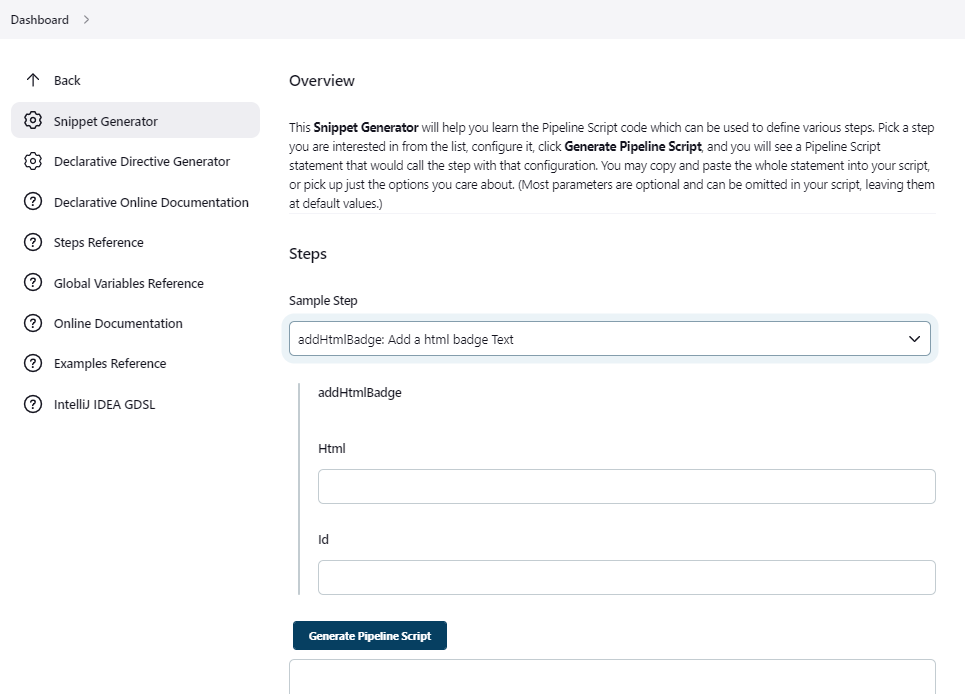
1. Jenkins snippet generator
Use jenkins snippet generator by adding /pipeline-syntax/ to your jenkins pipeline. to allow you to generate jenkins
pipeline code easily with inline doc. It also list the available variables.
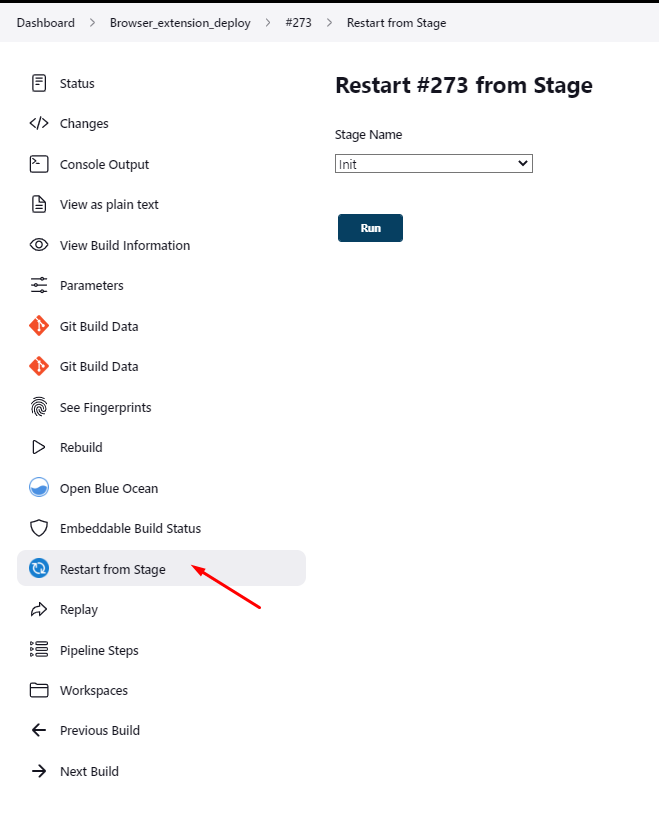
2. Declarative pipeline allows you to restart a build from a given stage
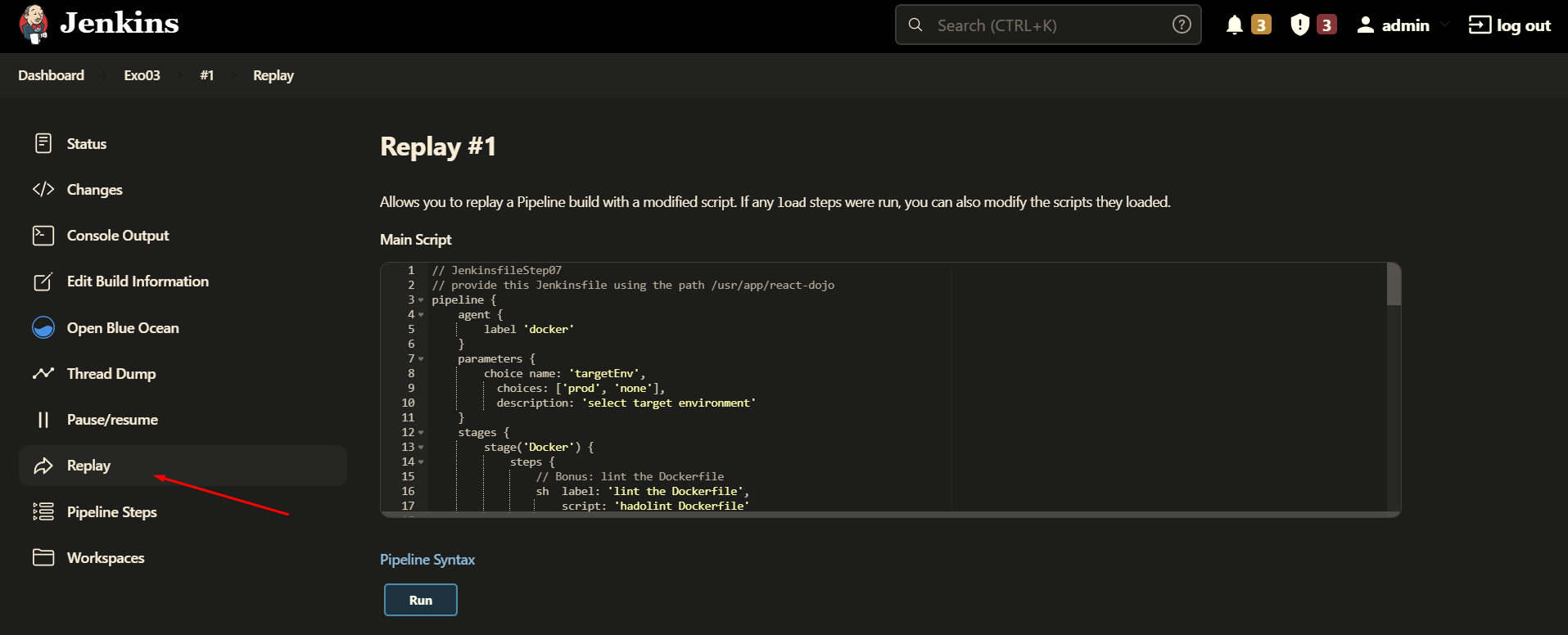
3. Replay a pipeline
Replaying a pipeline allows you to update your jenkinsfile before replaying the pipeline, easier debugging !
4. VS code Jenkinsfile validation
Please follow this documentation
enable jenkins pipeline linter in vscode
5. How to chain pipelines ?
Simply use the build directive followed by the name of the build to launch
6. Viewing pipelines hierarchy
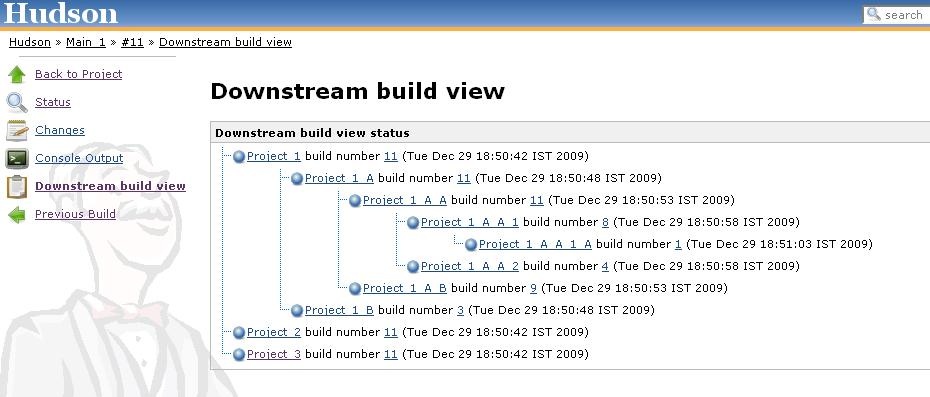
The downstream-buildview plugin allows to view the full chain of
dependent builds.