How to Write Dockerfiles
1. Dockerfile best practices
Follow official best practices and you can follow these specific best practices
But The worst so-called “best practice” for Docker
Backup, explains why you should actually also use
apt-get upgradeUse
hadolintUse
;\to separate each command line- some Dockerfiles are using
&&to separate commands in the same RUN instruction (I was doing it too ;-), but I strongly discourage it because it breaks the checks done byset -o errexit set -o errexitmakes the whole RUN instruction to fail if one of the commands has failed, but it is not the same when using&&
- some Dockerfiles are using
One package by line, packages sorted alphabetically to ease readability and merges
Always specify the most exact version possible of your packages (to avoid to get major version that would break your build or software)
do not usage docker image with latest tag, always specify the right version to use
2. Basic best practices
2.1. Best Practice #1: Merge the image layers
in a Dockerfile each RUN command will create an image layer.
2.1.1. Bad practice #1
Here a bad practice that you shouldn’t follow
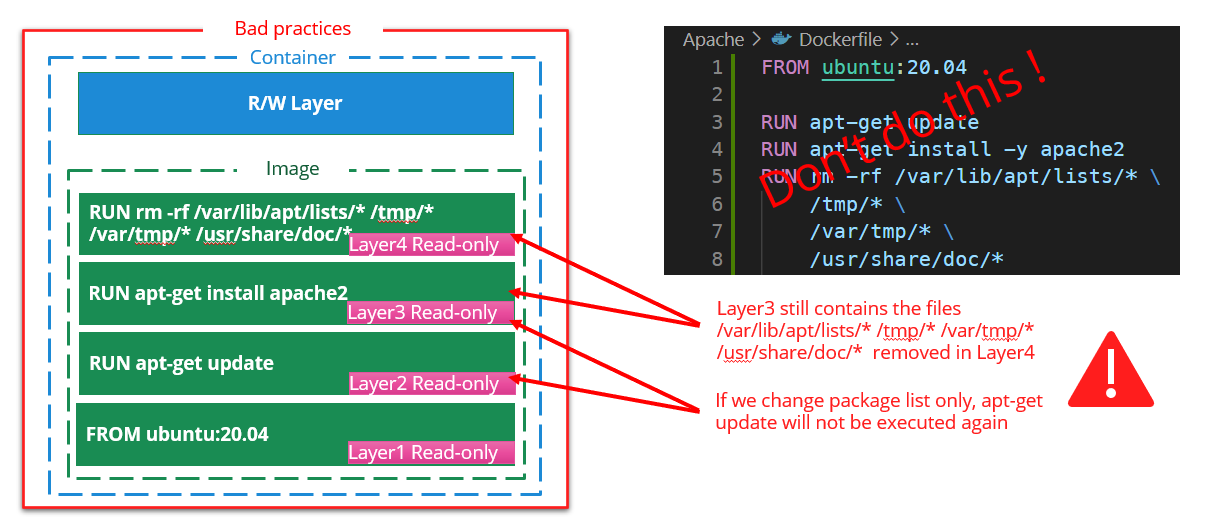
2.1.2. Best practice #1
Best practice #1 merge the RUN layers to avoid cache issue and gain on total image size
FROM ubuntu:20.04

RUN apt-get update \
    && apt-get install -y apache2 \
    && rm -rf \
        /var/lib/apt/lists/* \
        /tmp/* \
        /var/tmp/* \
        /usr/share/doc/*
2.2. Best Practice #2: trace commands and fail on error
from previous example we want to trace each command that is executed
2.2.1. Bad practice #2
when building complex layer and one of the command fails, it’s interesting to know which command makes the build to fail
FROM ubuntu:20.04

RUN apt-get update \
    && [ -d badFolder ] \
    && apt-get install -y apache2 \
    && rm -rf \
          /var/lib/apt/lists/* \
          /tmp/* \
          /var/tmp/* \
          /usr/share/doc/*
docker build . gives the following log output(partly truncated):
...
#5 [2/2] RUN apt-get update
    && [ -d badFolder ]
    && apt-get install -y apache2
    && rm -rf
      /var/lib/apt/lists/*
      /tmp/*
      /var/tmp/*
      /usr/share/doc/*
#5 3.818 Get:1 http://archive.ubuntu.com/ubuntu focal InRelease [265 kB]
...
#5 6.252 Fetched 25.6 MB in 6s (4417 kB/s)
#5 6.252 Reading package lists...
#5 ERROR: process "/bin/sh -c apt-get update
  && [ -d badFolder ]
  && apt-get install -y apache2
  && rm -rf
    /var/lib/apt/lists/*
    /tmp/*
    /var/tmp/*
    /usr/share/doc/*"
did not complete successfully: exit code: 1
------
> [2/2] RUN apt-get update
  && [ -d badFolder ]
  && apt-get install -y apache2
  && rm -rf
    /var/lib/apt/lists/*
    /tmp/*
    /var/tmp/*
    /usr/share/doc/*:
#5 5.383 Get:10 http://archive.ubuntu.com/ubuntu focal/main amd64 Packages [1275 kB]
...

------
Dockerfile1:3
--------------------
  2 |
  3 | >>> RUN apt-get update \
  4 | >>>     && [ -d badFolder ] \
  5 | >>>     && apt-get install -y apache2 \
  6 | >>>     && rm -rf \
  7 | >>>           /var/lib/apt/lists/\* \
  8 | >>>           /tmp/\* \
  9 | >>>           /var/tmp/\* \
  10 | >>>           /usr/share/doc/\*
  11 |
--------------------
ERROR: failed to solve: process "/bin/sh -c apt-get update
  && [ -d badFolder ]
  && apt-get install -y apache2
  && rm -rf
    /var/lib/apt/lists/*
    /tmp/*
    /var/tmp/*
    /usr/share/doc/*
did not complete successfully: exit code: 1
Not easy here to know that the command [ -d badFolder ] makes the build failing
Without the best practice #2, the following code build successfully
FROM ubuntu:20.04

RUN set -x ;\
    apt-get update ;\
    [ -d badFolder ] ;\
    ls -al
2.2.2. Best Practice #2
Best Practice #2: Override SHELL options of the RUN command and use ;\ instead of &&
The following options are set on the shell to override the default behavior:
set -o pipefail: The return status of a pipeline is the exit status of the last command, unless the pipefail option is enabled.- If pipefail is enabled, the pipeline’s return status is the value of the last (rightmost) command to exit with a non-zero status, or zero if all commands exit successfully.
- without it, a command failure could be masked by the command piped after it
set -o errexit(same asset -e): Exit immediately if a pipeline (which may consist of a single simple command), a list, or a compound command (see SHELL GRAMMAR above), exits with a non-zero status.set -o xtrace(same asset -x): After expanding each simple command, for command, case command, select command, or arithmetic for command, display the expanded value of PS4, followed by the command and its expanded arguments or associated word list.
Those options are not mandatory but are strongly advised. Although there are some workaround to know:
- if a command can fail and you want to ignore it, you can use
- commandThatCanFail || true
These options can be used with /bin/sh as well.
Also it is strongly advised to use ;\ to separate commands because it could happen that some errors are ignored when
&& is used in conjunction with ||
FROM ubuntu:20.04

# The SHELL instructions will be applied to all the subsequent RUN instructions
SHELL ["/bin/bash", "-o", "pipefail", "-o", "errexit", "-o", "xtrace", "-c"]
RUN apt-get update ;\
    [ -d  badFolder ] ;\
    apt-get install -y apache2 ;\
    rm -rf \
          /var/lib/apt/lists/* \
          /tmp/* \
          /var/tmp/* \
          /usr/share/doc/*
docker build . gives the following log output(partly truncated):
...
#5 [2/2] RUN apt-get update ;
  [ -d  badFolder ] ;
  apt-get install -y apache2 ;
  rm -rf
    /var/lib/apt/lists/*
    /tmp/*
    /var/tmp/*
    /usr/share/doc/*
#5 0.318 + apt-get update
#5 3.522 Get:1 http://archive.ubuntu.com/ubuntu focal InRelease [265 kB]
...
#5 5.310 Fetched 25.6 MB in 5s (5141 kB/s)
#5 5.310 Reading package lists...
#5 6.172 + '[' -d badFolder ']'
#5 ERROR: process "/bin/bash -o pipefail -o errexit -o xtrace -c
  apt-get update ;
  [ -d  badFolder ] ;
  apt-get install -y apache2 ;
  rm -rf
    /var/lib/apt/lists/*
    /tmp/*
    /var/tmp/*
    /usr/share/doc/*
did not complete successfully: exit code: 1
------
 > [2/2] RUN apt-get update ;
  [ -d  badFolder ] ;
  apt-get install -y apache2 ;
  rm -rf
    /var/lib/apt/lists/*
    /tmp/*
    /var/tmp/*
    /usr/share/doc/\*:
#5 4.228 Get:11 http://archive.ubuntu.com/ubuntu focal-updates/main amd64 Packages [3014 kB]
...
#5 6.172 + '[' -d badFolder ']'
------
Dockerfile1:4
--------------------
   3 |     SHELL ["/bin/bash", "-o", "pipefail", "-o", "errexit", "-o", "xtrace", "-c"]
   4 | >>> RUN apt-get update ;\
   5 | >>>     [ -d  badFolder ] ;\
   6 | >>>     apt-get install -y apache2 ;\
   7 | >>>     rm -rf \
   8 | >>>           /var/lib/apt/lists/\* \
   9 | >>>           /tmp/\* \
  10 | >>>           /var/tmp/\* \
  11 | >>>           /usr/share/doc/\*
  12 |
--------------------
ERROR: failed to solve: process "/bin/bash -o pipefail -o errexit -o xtrace -c
apt-get update ;    [ -d  badFolder ] ;    apt-get install -y apache2 ;    rm -rf
/var/lib/apt/lists/*         /tmp/*         /var/tmp/*         /usr/share/doc/*"
did not complete successfully: exit code: 1
Here the command line displayed just above the error indicates clearly from where the error comes from:
#5 6.172 + '[' -d badFolder ']'
2.3. Best practice #3: packages ordering and versions
Best Practice #3: order packages alphabetically, always specify packages versions, ensure non interactive
From previous example we want to install several packages
2.3.1. Bad practice #3
let’s add some packages on our previous example (errors removed)
The following docker has the following issues:
- it doesn’t set the package versions
- the installation will install also the recommended packages
- it’s using apt instead of apt-get (hadolint warning DL3027 Do not
use apt as it is meant to be a end-user tool, use
apt-getorapt-cacheinstead) - the packages are not ordered alphabetically
FROM ubuntu:20.04

SHELL ["/bin/bash", "-o", "pipefail", "-o", "errexit", "-o", "xtrace", "-c"]
RUN apt update ;\
    apt install -y php7.4 apache2 php7.4-curl redis-tools ;\
    rm -rf \
          /var/lib/apt/lists/* \
          /tmp/* \
          /var/tmp/* \
          /usr/share/doc/*
2.3.2. Best Practice #3
Best Practice #3: order packages alphabetically, always specify packages versions, ensure non interactive
2.3.2.1. Order packages alphabetically and one package by line
one package by line allows packages to be simpler ordered alphabetically
one package by line and ordering alphabetically allows :
- to merge branches changes more easily
- to detect redundancies more easily
- to improve readability
2.3.2.2. Always specify packages versions
over the time your build’s dependencies could be updated on the remote repositories and your packages be unattended upgraded to the latest version making your software breaks because it doesn’t manage the changes of the new package.
It happens several times for me, for example, in 2021, xdebug has been automatically upgraded on one of my docker image from version 2.8 to 3.0 making all the dev environments broken. It happens also on a build pipeline with a version of npm gulp that has been upgraded to latest version. In both cases we resolved the issue by downgrading the version to the one we were using.
2.3.2.3. Ensure non interactive
some apt-get packages could ask for interactive questions, you can avoid this using the env variable
DEBIAN_FRONTEND=noninteractive
Note: ARG instruction allows to set env variable available only during build time
FROM ubuntu:20.04

SHELL ["/bin/bash", "-o", "pipefail", "-o", "errexit", "-o", "xtrace", "-c"]

ARG DEBIAN_FRONTEND=noninteractive
RUN apt-get update ;\
    apt-get install -y -q --no-install-recommends \
        # Mind to use quotes to avoid shell to try to expand * with some files
        apache2='2.4.*' \
        php7.4='7.4.*' \
        php7.4-curl='7.4.*' \
        # Notice the ':'(colon)
        redis-tools='5:5.*' \
    ;\
    # cleaning
    apt-get autoremove -y ;\
    apt-get -y clean ;\
    rm -rf \
        /var/lib/apt/lists/* \
        /tmp/* \
        /var/tmp/* \
        /usr/share/doc/*

# use the following command to know the current version of the packages
# using another RUN instead of using previous one will avoid the whole
# previous layer to be rebuilt
# RUN apt-cache policy \
# apache2 \
# php7.4 \
# php7.4-curl \
# redis-tools
# Gives the following output
#6 0.387 + apt-cache policy apache2
#6 0.399 apache2:
#6 0.399   Installed: 2.4.41-4ubuntu3.14
#6 0.399   Candidate: 2.4.41-4ubuntu3.14
#6 0.399   Version table:
#6 0.399  *** 2.4.41-4ubuntu3.14 100
#6 0.399         100 /var/lib/dpkg/status
#6 0.400 + apt-cache policy php7.4
#6 0.409 php7.4:
#6 0.409   Installed: 7.4.3-4ubuntu2.18
#6 0.409   Candidate: 7.4.3-4ubuntu2.18
#6 0.409   Version table:
#6 0.409  *** 7.4.3-4ubuntu2.18 100
#6 0.409         100 /var/lib/dpkg/status
#6 0.409 + apt-cache policy php7.4-curl
#6 0.420 php7.4-curl:
#6 0.420   Installed: 7.4.3-4ubuntu2.18
#6 0.420   Candidate: 7.4.3-4ubuntu2.18
#6 0.420   Version table:
#6 0.420  *** 7.4.3-4ubuntu2.18 100
#6 0.421         100 /var/lib/dpkg/status
#6 0.421 + apt-cache policy redis-tools
#6 0.431 redis-tools:
#6 0.431   Installed: 5:5.0.7-2ubuntu0.1
#6 0.431   Candidate: 5:5.0.7-2ubuntu0.1
#6 0.431   Version table:
#6 0.431  *** 5:5.0.7-2ubuntu0.1 100
#6 0.432         100 /var/lib/dpkg/status
2.4. Best practice #4: ensure image receives latest security updates
from previous example we want to ensure the image receives the latest security updates
2.4.1. Bad practice #4
registry image are not always updated and latest apt security updates are not installed
FROM ubuntu:20.04

SHELL ["/bin/bash", "-o", "pipefail", "-o", "errexit", "-o", "xtrace", "-c"]

ARG DEBIAN_FRONTEND=noninteractive
RUN apt-get update ;\
    apt-get install -y -q --no-install-recommends \
        apache2='2.4.*' \
        php7.4='7.4.*' \
        php7.4-curl='7.4.*' \
        redis-tools='5:5.*' \
    ;\
    # cleaning
    apt-get autoremove -y ;\
    apt-get -y clean ;\
    rm -rf \
        /var/lib/apt/lists/* \
        /tmp/* \
        /var/tmp/* \
        /usr/share/doc/*
2.4.2. Best Practice #4
be sure to apply latest security updates, to install the
latest security updates in the image, keep sure to call apt-get upgrade -y
Here the updated Dockerfile:
FROM ubuntu:20.04

SHELL ["/bin/bash", "-o", "pipefail", "-o", "errexit", "-o", "xtrace", "-c"]

ARG DEBIAN_FRONTEND=noninteractive
RUN apt-get update ;\
    # be sure to apply latest security updates
    # https://pythonspeed.com/articles/security-updates-in-docker/
    apt-get upgrade -y ;\
    apt-get install -y -q --no-install-recommends \
        apache2='2.4.*' \
        php7.4='7.4.*' \
        php7.4-curl='7.4.*' \
        redis-tools='5:5.*' \
    ;\
    # cleaning
    apt-get autoremove -y ;\
    apt-get -y clean ;\
    rm -rf \
        /var/lib/apt/lists/* \
        /tmp/* \
        /var/tmp/* \
        /usr/share/doc/*
2.5. Conclusion: image size comparison
from previous example we want to ensure the image receives the latest security updates
2.5.1. Dockerfile without best practices
FROM ubuntu:20.04

ARG DEBIAN_FRONTEND=noninteractive
RUN apt-get update
RUN apt-get install -y apache2 php7.4 php7.4-curl redis-tools
# cleaning
RUN apt-get autoremove -y ;\
    apt-get -y clean ;\
    rm -rf \
        /var/lib/apt/lists/* \
        /tmp/* \
        /var/tmp/* \
        /usr/share/doc/*
2.5.2. Dockerfile with all optimizations
FROM ubuntu:20.04

SHELL ["/bin/bash", "-o", "pipefail", "-o", "errexit", "-o", "xtrace", "-c"]

ARG DEBIAN_FRONTEND=noninteractive
RUN apt-get update ;\
    apt-get upgrade -y ;\
    apt-get install -y -q --no-install-recommends \
        apache2='2.4.*' \
        php7.4='7.4.*' \
        php7.4-curl='7.4.*' \
        redis-tools='5:5.*' \
    ;\
    # cleaning
    apt-get autoremove -y ;\
    apt-get -y clean ;\
    rm -rf \
        /var/lib/apt/lists/* \
        /tmp/* \
        /var/tmp/* \
        /usr/share/doc/*
3. Docker Buildx best practices
3.1. Optimize image size
Source: https://askubuntu.com/questions/628407/removing-man-pages-on-ubuntu-docker-installation
Let’s consider this example
3.1.1. Dockerfile not optimized
FROM ubuntu:20.04 as stage1

ARG DEBIAN_FRONTEND=noninteractive

SHELL ["/bin/bash", "-o", "pipefail", "-o", "errexit", "-o", "xtrace", "-c"]
RUN \
    apt-get update ;\
    apt-get install -y -q --no-install-recommends \
        htop

FROM stage1 as stage2

SHELL ["/bin/bash", "-o", "pipefail", "-o", "errexit", "-o", "xtrace", "-c"]
RUN \
    # here we just test that the ARG DEBIAN_FRONTEND has been inherited from
    # previous stage (it is the case)
    echo "DEBIAN_FRONTEND=${DEBIAN_FRONTEND}"
Now let’s build and check the image size, the best way to do this is to export the image to a file
docker build and save:
docker build -f Dockerfile1 -t test1 .
docker save test1 -o test1.tar
Now we will optimize this image by removing man pages (you can still find man pages on the web) and removing apt cache
3.1.2. Dockerfile optimized
FROM ubuntu:20.04 as stage1

ARG DEBIAN_FRONTEND=noninteractive

COPY 01-noDoc /etc/dpkg/dpkg.cfg.d/

COPY 02-aptNoCache /etc/apt/apt.conf.d/
SHELL ["/bin/bash", "-o", "pipefail", "-o", "errexit", "-o", "xtrace", "-c"]
RUN \
    # remove apt cache and man/doc
    rm -rf /var/cache/apt/archives /usr/share/{doc,man,locale}/ ;\
    \
    apt-get update ;\
    apt-get install -y -q --no-install-recommends \
        htop \
    ;\
    # clean apt packages
    apt-get autoremove -y ;\
    ls -al /var/cache/apt ;\
    rm -rf /var/lib/apt/lists/* /tmp/* /var/tmp/* /usr/share/doc/*

FROM stage1 as stage2

SHELL ["/bin/bash", "-o", "pipefail", "-o", "errexit", "-o", "xtrace", "-c"]
RUN \
    echo "DEBIAN_FRONTEND=${DEBIAN_FRONTEND}"
Here the content of /etc/dpkg/dpkg.cfg.d/01-noDoc, it will tell apt to not install man docs and translations
# /etc/dpkg/dpkg.cfg.d/01_nodoc

# Delete locales
path-exclude=/usr/share/locale/*

# Delete man pages
path-exclude=/usr/share/man/*

# Delete docs
path-exclude=/usr/share/doc/*
path-include=/usr/share/doc/*/copyright
Here the content of /etc/apt/apt.conf.d/02-aptNoCache, it will instruct apt to not store any cache (note that apt-get
clean will not work after that change but you don’t need to use it anymore)
Dir::Cache "";
Dir::Cache::archives "";
Now let’s build and check the image size, the best way to do this is to export the image to a file
docker build and save:
docker build -f Dockerfile2 -t test2 .
docker save test2 -o test2.tar
Here the size of the files
test1.tar 117 020 672 bytes
test2.tar  76 560 896 bytes
We passed from ~117MB to ~76MB so we gain ~41MB Please note also that we used --no-install-recommends option in both
example that allows us to save some other MB